
For students preparing for competitive exams, having quick and reliable access to online classes, recorded lectures, mock tests, and study material can make a big difference. Careerwill Login is the starting point for accessing your Careerwill account and the courses associated with it.
Careerwill is an online learning and exam preparation platform that provides courses for several government and competitive examinations, along with school-level learning. Its platform currently highlights live interactive classes, recorded and downloadable classes, handwritten PDFs, mock tests, personalized groups, and doubt-solving features.
Whether you are using the Careerwill app login or accessing your account through a browser, the basic purpose is the same: sign in to your account and reach your available learning content.
In this guide, we will explain how to complete Careerwill login, how the app and website experience differ, how to access purchased courses, what to do if you forget your password, and how to troubleshoot common Careerwill login problems. We will also review the overall platform experience so you can understand whether Careerwill is suitable for your online exam preparation needs.
What Is Careerwill Login?
Careerwill Login is the sign-in process used to access an existing Careerwill account. If you have already registered with Careerwill or enrolled in a course, you can use your registered details to access your account rather than creating a new account every time.
The login process is useful for students who want to access their enrolled courses, live classes, recorded lectures, study materials, and other available learning resources.
Careerwill’s official FAQ says users can log in using their registered email ID or mobile number along with their password.
The important distinction is between registration and login. Registration creates a new account, while login gives an existing user access to that account.
Who Uses Careerwill Login?
Careerwill is aimed at students preparing for a wide range of examinations and educational programs. Its current platform lists preparation for exams including SSC CGL, SSC CHSL, RRC Group D, SSC MTS, UPSSSC PET, SSC GD, banking examinations, RRB examinations, and UPSC Civil Services.
Depending on the course you have selected, your account may contain:
- Live online classes
- Recorded lectures
- Mock tests
- Practice questions
- PDF study material
- Handwritten notes
- Doubt-solving resources
- Course-specific content
This means the Careerwill student login is more than simply signing into a website. It is the gateway to the learning resources associated with your account.
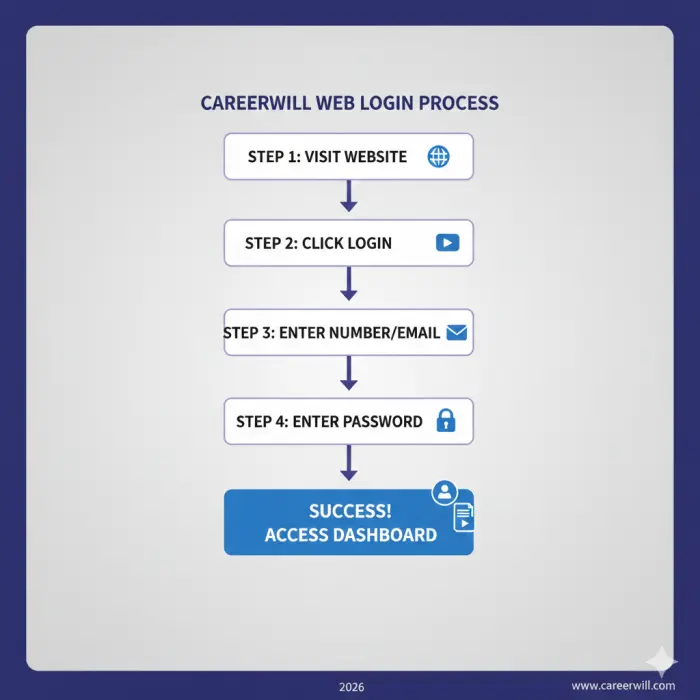
How to Complete Careerwill Login
The Careerwill login process is generally straightforward if you already have an account and remember your registered credentials.
Open the Careerwill Login Page
First, open the official Careerwill platform through the website or use the Careerwill mobile application.
If you prefer studying on a laptop or desktop, the website can be more convenient because of the larger screen. If you mainly study from your phone, the Careerwill app provides a more mobile-focused experience.
Always make sure you are using the official Careerwill platform rather than entering your account details on an unfamiliar third-party website.
Enter Your Registered Details
Once the login screen is open, enter the details associated with your Careerwill account.
Depending on the available login interface, this can include your registered:
- Mobile number
- Email ID
- Password
Careerwill’s official FAQ confirms that the registered email ID or mobile number can be used with the account password for login.
Make sure there are no typing errors, especially if your password contains capital letters, numbers, or special characters.
Complete Verification If Required
If Careerwill asks you to complete an OTP or another verification step, follow the instructions shown on the screen.
This can be particularly important if you are recovering access to an account or using a login method that requires additional verification.
Keep access to the mobile number associated with your account because it may be required for account recovery.
Access Your Account
After successful authentication, you should be taken into your Careerwill account.
From there, you can look for your enrolled courses, available classes, study resources, and other features associated with your account.
If you have purchased a course but cannot find it immediately, check the My Courses or purchased-course area rather than assuming the enrollment has disappeared.
Careerwill App Login
For students who prefer learning on a smartphone, Careerwill app login is one of the most convenient ways to access their account.
The Careerwill platform currently promotes features including live interactive sessions, handwritten PDFs, personalized groups, recorded and downloadable classes, and doubt-solving through its app experience.
How to Login Through the Careerwill App
The general process is:
- Open the Careerwill application.
- Select the login option.
- Enter your registered mobile number or email, where supported.
- Enter your account password.
- Complete any requested verification.
- Open your account and check your courses.
The exact appearance of the app can change when Careerwill releases updates, so focus on the current login prompts shown in your version of the application.
Careerwill Login on Android
Android can be particularly useful for students who study while travelling or prefer using their phone instead of a computer.
After completing your Careerwill app login, you can access the learning content available with your account. Careerwill promotes live classes, recorded content, PDFs, mock tests, and other learning resources across its platform.
For the best experience, keep your application updated and make sure your device has a stable internet connection when attending live classes.
Careerwill Login on iPhone
Students using iPhones can also use the available Careerwill application where supported.
The main advantage of app-based learning is flexibility. You can use your phone for live sessions and revision rather than depending entirely on a desktop computer.
However, students who watch long lectures or work extensively with PDFs may prefer a larger screen when possible.
Careerwill Website Login
The Careerwill website login option is useful for students who prefer accessing their courses through a browser.
A laptop or desktop can provide a larger viewing area, which may be more comfortable for long lectures, reading PDFs, taking notes, and completing practice activities.
The web experience is also useful if your primary study setup is a computer rather than a smartphone.
Careerwill Web Login vs App Login
The basic account remains connected to your Careerwill profile, but the experience can differ depending on the device and feature.
The app can be more convenient for mobile learning and may provide features such as downloading recorded sessions for offline viewing. Careerwill’s official FAQ specifically states that recorded sessions can be downloaded through the app and that this download feature is not currently available on the web.
This is an important difference for students who frequently study without an internet connection.
If your main requirement is watching lessons on a larger display, however, the Careerwill online login through a browser may be more comfortable.
What Can You Access After Careerwill Login?
The main reason students complete a Careerwill account login is to access their learning resources.
Your exact content depends on the courses you have enrolled in, but Careerwill currently promotes several learning features.
My Courses
After signing in, one of the first places to check is the course section.
Careerwill’s official FAQ explains that students can find enrolled and completed courses through My Courses → Purchased Batch.
If you have purchased a course, this is one of the first places to look after your Careerwill student login.
Live Classes
Live classes allow students to attend lessons in real time.
Careerwill promotes live interactive sessions as part of its learning platform, emphasizing teacher-student interaction.
For students who benefit from asking questions while a topic is being explained, live classes can provide a more interactive experience than studying entirely from recorded videos.
Recorded Classes
Recorded lectures are useful when you cannot attend a live session or want to revise a topic again.
Careerwill’s official FAQ says students can watch missed sessions and that recordings can be downloaded through the app for offline viewing in supported courses.
This flexibility can be particularly useful for students balancing exam preparation with school, university, work, or other responsibilities.
Mock Tests
Mock tests are another important part of competitive exam preparation.
Careerwill currently highlights mock-test resources designed to help students practice and evaluate their preparation.
Instead of only watching lectures, students can use tests to identify weak subjects, practice under time pressure, and become familiar with exam-style questions.
Study Material and PDFs
Study material can make revision easier because students do not have to rely entirely on video lectures.
Careerwill promotes handwritten PDFs and other course-related study resources.
Its FAQ also states that PDFs can be downloaded through the Lessons section, with PDFs available in Hindi and English where provided.
Forgot Careerwill Password? Here’s What to Do
Forgetting a password is one of the most common reasons students search for Careerwill password reset instructions.
Fortunately, Careerwill provides a password-recovery process through the login interface.
Step 1: Select Forgot Password
Open the Careerwill login screen and look for the Forgot Password option.
Select it instead of repeatedly entering a password that is not working.
Step 2: Use Your Registered Information
Follow the recovery instructions and provide the information requested by Careerwill.
Your registered mobile number is particularly important because the official FAQ says an OTP is sent to the registered mobile number during password recovery.
Step 3: Enter the OTP
Enter the OTP you receive.
If the code does not arrive immediately, check your mobile network and wait before requesting another code.
Step 4: Create a New Password
After successful verification, enter your new password and confirm it.
Careerwill’s documented process instructs users to enter and reconfirm the new password before saving the changes.
Step 5: Login Again
Return to the login screen and use your updated password.
If the new credentials work, you should regain access to your account and enrolled learning resources.
Careerwill Login Problems and Solutions
Sometimes the problem is not the platform itself but incorrect credentials, connectivity, an outdated application, or confusion about which account contains a course.
Here are some common Careerwill login problems and practical things to check.
Careerwill Login Not Working
If your Careerwill login not working issue appears suddenly, first check the basics.
Make sure:
- Your email or mobile number is correct.
- Your password is entered correctly.
- Your internet connection is stable.
- You are using the official website or application.
- Your app/browser is updated.
- You have not accidentally registered a second account.
If you have forgotten the password, use the password-recovery option instead of repeatedly trying different passwords.
Incorrect Password
An incorrect-password message usually means the credentials do not match the account.
Check for:
- Capital letters
- Extra spaces
- Incorrect numbers
- Typing errors
- An old password
If you still cannot sign in, use the Careerwill forgot password option.
OTP Not Received
If you are expecting an OTP but do not receive it, check whether your registered mobile number has network service.
You should also allow some time for the message to arrive before requesting another OTP.
If the problem continues, verify that you are using the mobile number associated with the Careerwill account.
Course Not Showing After Login
If you can successfully complete your Careerwill account login but your purchased course is missing, check your My Courses or Purchased Batch area.
Careerwill’s FAQ directs students to My Courses and Purchased Batch for enrolled and completed courses.
Also make sure you have logged into the same account used when purchasing the course.
Login Works but Classes Are Not Available
Logging into an account does not automatically mean that every Careerwill course is available.
Course access depends on enrollment.
If you have purchased a particular batch, look for that batch in your course area. If it is missing, verify the account used for the purchase and check the relevant enrollment information.
Careerwill App Login Problems
If the Careerwill app login is not working while your internet connection is fine, try basic troubleshooting:
- Close and reopen the app.
- Check for an app update.
- Restart your device.
- Confirm your login details.
- Try the web version if available.
- Reset your password if necessary.
If the problem continues across devices, it may be worth checking Careerwill’s current support information.
Careerwill Login vs Registration
Another common point of confusion is the difference between Careerwill login and registration.
Registration is for creating an account. Login is for accessing an account that already exists.
| Feature | Careerwill Login | Careerwill Registration |
| Existing account | Yes | No |
| Create account | No | Yes |
| Enter password | Yes | During account setup |
| Access existing courses | Yes | After enrollment |
| Password recovery | Available | Not applicable |
| Account verification | May be required | May be required |
If you have never created an account, you need to complete registration first.
Once your account exists, you can use the Careerwill student login whenever you want to access your account.
Careerwill Login Review: Is the Platform Easy to Use?
Looking at Careerwill from a user’s perspective, the login itself is not the most important part of the platform. What matters more is what happens after you sign in.
The platform currently combines several types of educational content, including live classes, recorded lectures, mock tests, PDFs, and other study resources.
Ease of Login
For an existing user with the correct mobile number/email and password, the basic login process is simple.
The availability of password recovery is also helpful when students forget their credentials.
Mobile Experience
The mobile-first approach can be useful for students who study away from a traditional classroom.
You can use your phone for lectures, revision, and other course activities. For students who prefer offline viewing, Careerwill’s FAQ specifically notes that recorded sessions can be downloaded through the app.
Course Access
The My Courses/Purchased Batch structure provides a central place for enrolled courses.
This is particularly helpful if you have purchased multiple batches or use Careerwill for more than one examination.
Learning Features
Careerwill has a relatively broad collection of learning features.
Its current platform highlights:
- Live interactive classes
- Recorded classes
- Handwritten PDFs
- Mock tests
- Personalized groups
- Doubt-solving
- Exam-specific courses
That combination can make the platform more useful than a service that only provides recorded videos.
Desktop Experience
Students who prefer a larger display may find Careerwill web login more comfortable for long study sessions.
A computer can be especially convenient for reading notes and watching lengthy lectures.
However, the app has an important advantage for offline recording downloads, according to Careerwill’s current FAQ.
Overall User Experience
Overall, Careerwill is better suited to students who want several preparation resources inside one learning account.
The main advantage is the combination of different learning formats. The main potential limitation is that students still need a reliable internet connection for online access and must make sure they are using the correct account for their enrolled courses.
Careerwill Login for Purchased Courses
If you have purchased a Careerwill course, logging in is only the first step. You also need to locate the batch associated with your account.
A simple process is
- Complete Careerwill online login.
- Open the course/dashboard area.
- Go to My Courses.
- Look for Purchased Batch.
- Select your enrolled course.
- Open the available lessons, classes, tests, or study material.
Careerwill’s official FAQ specifically directs users to My Courses → Purchased Batch for enrolled and completed courses.
If your course does not appear, don’t immediately purchase it again. First check whether you are signed into the same account used for enrollment.
Tips for a Smooth Careerwill Login Experience
A few simple habits can make accessing your Careerwill account easier.
Keep Your Registered Mobile Number Active
Because the registered mobile number can be used for account-related verification and password recovery, keeping access to it is important.
Remember Your Login Details
Store your password securely rather than repeatedly resetting it.
Never share your account password with other people.
Keep the App Updated
Using a current version of the application can help prevent compatibility issues.
Use a Stable Internet Connection
A stable connection is particularly important for live classes and video lectures.
Check the Correct Account
If you have more than one email address or mobile number, make sure you are using the account associated with your purchased course.
Use Password Recovery When Needed
If you cannot remember your password, use the official recovery process instead of making multiple unsuccessful login attempts.
Frequently Asked Questions About Careerwill Login
How do I login to Careerwill?
Open the Careerwill website or app, select the login option, and enter your registered email ID or mobile number with your password. Careerwill’s official FAQ confirms that registered email or mobile credentials can be used for login.
Can I login to Careerwill with my mobile number?
Yes. Careerwill’s official FAQ states that users can log in using their registered mobile number along with their password.
Can I login to Careerwill with email?
Yes. A registered email ID can also be used for Careerwill login according to the platform’s FAQ.
How do I reset my Careerwill password?
Select Forgot Password on the login screen. Careerwill’s documented process sends an OTP to the registered mobile number. After verification, you can create and confirm a new password and then log in again.
Why is my Careerwill login not working?
Check your registered email/mobile number, password, internet connection, app version, and browser. If you have forgotten your password, use the password-reset option.
Where can I find my purchased Careerwill course?
After completing your Careerwill student login, check My Courses and then the Purchased Batch section. Careerwill’s official FAQ identifies this as the location for enrolled and completed courses.
Can I access Careerwill courses after login?
Yes, if the course is associated with your account. After logging in, check your course area for purchased or enrolled batches and the content included with your enrollment.
Can I use Careerwill on a laptop?
Careerwill provides web-based access to its learning platform, so students can use a browser for supported course access. The web experience can be convenient for students who prefer a larger screen.
Is Careerwill login free?
Logging into an existing account is different from purchasing a course. Careerwill offers various courses and learning programs, and access to specific paid content depends on your enrollment.
Do I need to register before Careerwill login?
Yes. You need an existing account before you can sign in. New users should complete the registration process first, while returning users can use the Careerwill login option.
Final Verdict: Is Careerwill Login Worth Using?
Careerwill Login is essentially the gateway to Careerwill’s broader online learning platform. For an existing student, the sign-in process is straightforward, and the ability to access courses through the app or web platform gives users flexibility.
The bigger advantage comes after login. Careerwill currently combines live interactive classes, recorded lectures, mock tests, handwritten PDFs, personalized learning groups, and doubt-solving resources across its platform.
The app can be especially useful for students who want mobile learning and offline access to supported recorded sessions, while the website can be more comfortable for students who prefer a laptop or desktop. Careerwill’s FAQ confirms that recording downloads are currently an app feature rather than a web feature.
Overall, Careerwill can be a practical option for students looking for a centralized platform for competitive-exam preparation. The best experience will depend on the course you choose, your preferred teachers, your study routine, and how consistently you use the available learning resources.