
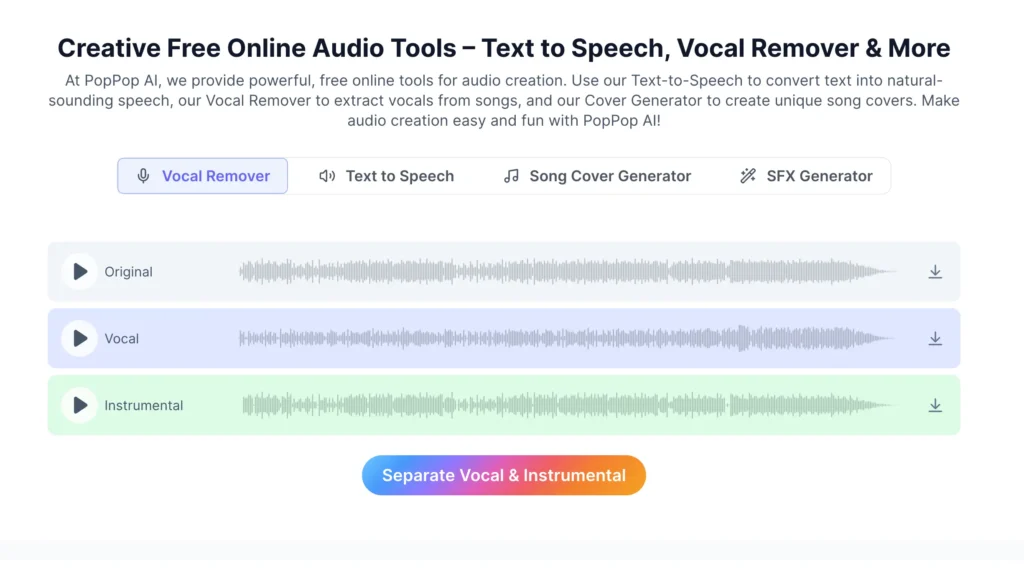
AI has changed the way people create, edit, and transform digital content. Audio is one area where this change has become especially noticeable. Instead of spending hours recording voiceovers, removing vocals, creating sound effects, or editing individual audio tracks, creators can now use AI-powered tools to speed up the process.
PopPop AI is one of the platforms attracting attention in this space. It brings several AI audio tools together, including text-to-speech, AI voice generation, vocal removal, song covers, voice changing, and sound-effect generation. The platform is aimed at creators who want quick access to AI audio features without necessarily using complicated professional audio software.
But is PopPop AI actually worth using? Is PopPop AI free? Is PopPop AI safe and legit? How good are its AI voice and audio tools, and how does it compare with other AI audio platforms?
This PopPop AI review takes a detailed look at the platform, including its features, pricing, usability, safety considerations, pros and cons, alternatives, and overall value.
What Is PopPop AI?
PopPop AI is an online AI-powered audio platform designed to help users create, transform, and process audio through different artificial intelligence tools. Instead of focusing on only one feature, the platform combines several audio utilities in one place.
The official [PopPop AI audio platform] offers tools such as text-to-speech, vocal removal, AI song covers, sound-effect generation, voice generation, and voice-changing capabilities.
The idea behind PopPop AI is relatively simple: users can choose an audio-related tool, provide text, upload or select audio, adjust available options, and let the AI handle the processing.
This makes the platform potentially useful for:
- YouTube creators
- TikTok and social media creators
- Podcasters
- Musicians
- Video editors
- Students
- Voiceover creators
- Karaoke enthusiasts
- Hobbyists
- People experimenting with AI audio
Unlike professional digital audio workstations, PopPop AI is primarily focused on making specific AI-powered audio tasks easier. Someone who only needs a quick voiceover or vocal remover may not want to learn complicated audio-production software.
That is where a tool such as PopPop AI can be useful.
How Does PopPop AI Work?
The basic workflow of PopPop AI depends on the tool being used, but the overall process is designed to be straightforward.
For example, someone using the PopPop AI voice generator can enter text, select a suitable AI voice, adjust available settings, and generate an audio file. Similarly, someone using the vocal remover can upload an audio or video file and process it to separate vocals from instrumental content.
A typical workflow looks like this:
Choose an AI tool → Upload or enter content → Select settings → Generate/process → Preview → Download
The platform supports several common audio and video formats for its vocal-removal tool. Its vocal separator, for example, supports formats including MP3, WAV, FLAC, MP4, MKV, and MOV, with stated limits of up to 400 MB and 20 minutes for that particular tool.
This makes the service more accessible to people who may not have experience with advanced audio editing.
Another advantage is that several PopPop AI tools work directly through a web browser. Users do not necessarily need to install traditional audio software before trying the online tools.
PopPop AI Features
One of the biggest reasons people search for a PopPop AI review is the number of different audio features available on the platform. Instead of offering only an AI voice generator, PopPop AI covers several areas of AI-powered audio creation.
PopPop AI Voice Generator
The PopPop AI voice generator is designed to convert written text into spoken audio.
This can be useful when creators need narration but do not want to record their own voice. For example, a YouTube creator could prepare a script and use an AI voice to produce narration.
The platform offers multiple languages and accents, including English, Hindi, Urdu, Arabic, Japanese, Korean, Spanish, French, German, Italian, Portuguese, and others.
Voice-generation tools can be useful for:
- YouTube narration
- Educational content
- Short-form videos
- Podcasts
- Explainer videos
- Social media content
- Demonstration videos
PopPop AI also provides controls for aspects such as speed, pitch, and voice style on its online voice generator.
The quality of AI-generated speech can vary depending on the selected voice and the text being processed, so users should listen to the output before publishing it.
PopPop AI Text to Speech
PopPop AI text to speech, also known as PopPop AI TTS, converts written content into spoken audio.
Text-to-speech can save time when creating narration for videos, presentations, tutorials, and other digital content.
For example, a creator could write a short product explanation and turn it into an AI voiceover rather than recording it manually.
The platform supports different voices and languages, which makes the feature more flexible for multilingual creators.
However, users should remember that natural speech is not only about pronunciation. Tone, pauses, emotion, and context can influence how realistic an AI voice sounds. Therefore, longer scripts may require editing or experimentation with different settings.
PopPop AI Voice Changer
Another feature associated with PopPop AI is its AI voice changer.
A voice changer can be useful for entertainment, creative projects, characters, gaming content, and other situations where a creator wants to transform an existing voice.
The practical value depends on the available voice models and the quality of the transformation.
Users should also be careful when using AI voice-changing technology to imitate recognizable people. Creating misleading content or using someone’s voice without appropriate permission can create ethical, legal, or platform-policy issues.
PopPop AI Vocal Remover
The PopPop AI vocal remover is one of the more practical tools on the platform.
It is designed to separate vocals from instrumental music. This can be useful for karaoke, remixing, practice sessions, music analysis, and creative audio projects.
The process is simple:
- Upload an audio or video file or provide a supported URL.
- Start the vocal-removal process.
- Let the AI separate the audio.
- Download the vocal and instrumental results.
The platform states that its online vocal remover can handle files up to 400 MB and 20 minutes for the supported workflow.
The results can be impressive, but no vocal-removal system is perfect. Songs with complicated arrangements, heavy effects, overlapping frequencies, or unusual mixing can produce unwanted artifacts.
Therefore, PopPop AI vocal remover is best viewed as a convenient AI separation tool rather than a replacement for professional studio techniques.
PopPop AI Karaoke
Because vocal removal can create instrumental versions of songs, PopPop AI can also be useful for karaoke-style applications.
A user can process a song, remove or separate the vocals, and use the resulting instrumental track for practice.
However, copyright remains important. Removing vocals from a copyrighted song does not automatically give someone permission to redistribute, publish, or commercially exploit the resulting track.
PopPop AI Song Cover Generator
The PopPop AI song cover generator is another interesting feature.
AI cover technology can transform songs using AI-generated or AI-assisted voices. This allows users to experiment with different styles and vocal interpretations.
For entertainment and experimentation, this can be fun. Creators can explore what a song might sound like with a different type of voice or character.
At the same time, AI covers raise important copyright and personality-rights questions. Users should understand the rights associated with the original song and any recognizable voice being used before publishing or monetizing content.
PopPop AI Sound Effects
The PopPop AI sound generator is designed to create sound effects using artificial intelligence.
This can be useful for video creators who need background sounds but do not have access to a large sound library.
Possible applications include:
- YouTube videos
- Short films
- Games
- Social media videos
- Podcasts
- Animations
- Storytelling projects
AI-generated sound effects can save time because creators do not always need to search through large libraries to find a suitable effect.
Read More: Gramhir.pro Review 2026: Is It a Legit AI Image Generator?
PopPop AI User Experience
A good AI tool should not only have interesting features; it should also be easy to use.
One of the strengths of PopPop AI is its relatively straightforward approach. Users can select a tool based on the task they want to complete instead of learning an entire professional audio-editing environment.
For beginners, this can reduce the learning curve.
The browser-based approach is also convenient because users can access online audio tools without installing a large desktop application.
However, simplicity can sometimes come with fewer advanced controls. A professional audio engineer may want detailed waveform editing, multitrack mixing, advanced equalization, compression, automation, and other studio-level functions.
PopPop AI is therefore better positioned as a convenient AI audio toolkit than as a complete replacement for professional digital audio workstation software.
PopPop AI Pricing: Is PopPop AI Free?
One of the most important questions in any PopPop AI review is pricing.
Is PopPop AI free?
Yes, PopPop AI currently offers free access to several online audio tools, although usage limits can vary depending on the feature and plan.
The platform’s audio-tools pricing page lists a Free plan at $0 with daily conversion and song-generation limits. It also lists a Basic paid plan at $9.95 per month, along with an annual option and an Enterprise plan with custom limits.
The exact limits can differ by tool, so users should check the relevant pricing information before subscribing.
PopPop AI Free
The free option can be useful for someone who wants to test the platform before paying.
For casual users, free access may be enough for occasional:
- Text-to-speech generation
- Audio processing
- Song experiments
- Voice-related projects
- Sound-effect creation
However, frequent creators may reach free limits more quickly.
PopPop AI Premium and Paid Plans
Users with higher-volume requirements may consider a paid plan.
A paid subscription can be more attractive to creators who need:
- More conversions
- Higher usage limits
- Faster processing
- Voice cloning
- Additional storage
- Greater access to premium functionality
Because pricing and limits can change, it is better to verify the current plan before making a purchase rather than relying on an old review.
Is PopPop AI Safe and Legit?
Is PopPop AI Legit?
Based on its active website, published service information, and available tools, PopPop AI is a real AI audio platform rather than simply a generic name used for an unknown service.
It provides identifiable tools for text-to-speech, voice generation, vocal removal, AI covers, and sound effects.
However, “legit” does not automatically mean that every generated result will be perfect. Users should evaluate the output and understand the platform’s terms before using it for important commercial work.
Is PopPop AI Safe?
The answer requires some nuance.
PopPop AI has published privacy and terms documentation explaining how information is handled and how its services operate. The privacy policy says the platform may collect information such as account details, usage information, device data, and payment information where applicable.
That means users should follow the same basic privacy precautions they would use with any online AI service.
Avoid uploading:
- Passwords
- Private documents
- Confidential business recordings
- Sensitive personal recordings
- Private customer information
- Content you do not have permission to process
Users should also read the platform’s current terms and privacy policy before using the service for commercial or sensitive projects.
Copyright and Voice Considerations
AI audio technology creates additional responsibilities.
For example, if you generate an AI song cover using copyrighted music, you may still need to consider copyright restrictions.
Similarly, using a recognizable person’s voice without permission can raise legal and ethical issues.
The safest approach is to use AI audio for content you have the appropriate rights to use and avoid presenting generated or transformed voices as genuine recordings of real people.
PopPop AI Reviews and User Feedback
Public feedback can provide additional context, but it needs to be interpreted carefully.
At the time of this review, the PopPop AI Trustpilot profile has only a small number of reviews, so it would not be responsible to use that sample alone to make a broad statement about overall customer satisfaction.
The available reviews include positive comments about convenience and audio tools, while the small sample also contains less positive feedback.
This is important because many online reviews of AI tools can be based on specific use cases. A person using PopPop AI for occasional karaoke may have a very different experience from someone using it for daily professional voice production.
Therefore, the best approach is to consider reviews as one part of the evaluation rather than treating a small review count as definitive evidence.
PopPop AI Pros and Cons
Pros
- Multiple AI audio tools in one platform
- Text-to-speech functionality
- AI voice generation
- Vocal removal
- AI song covers
- Sound-effect generation
- Browser-based access
- Beginner-friendly workflow
- Free options available
- Useful for content creators
- Supports multiple languages and accents
Cons
- AI output can vary between projects
- Complex audio may produce imperfect separation
- Professional users may need more advanced editing controls
- AI covers can involve copyright concerns
- Voice imitation can create ethical and legal issues
- Free usage has limits for some features
- Public review data is still limited
PopPop AI vs Other AI Audio Tools
PopPop AI vs ElevenLabs
PopPop AI and ElevenLabs both operate in the broader AI voice space, but they can appeal to different users.
PopPop AI is attractive when someone wants several audio utilities in one platform, including vocal removal, song covers, sound effects, and voice tools.
ElevenLabs is more strongly associated with advanced AI voice generation and voice-related workflows.
If your primary requirement is voice generation, it is worth comparing voice quality, languages, controls, licensing, and pricing directly.
PopPop AI vs Suno
Suno is primarily associated with AI music creation, while PopPop AI offers a broader collection of audio utilities.
Someone interested mainly in generating complete AI songs may prefer a dedicated AI music platform. Someone who wants text-to-speech, vocal removal, voice tools, sound effects, and covers may find PopPop AI’s wider collection more useful.
PopPop AI vs CapCut
CapCut is primarily a video-editing platform with a broad collection of editing and AI features.
PopPop AI is more focused on audio-specific AI tools.
For someone producing complete social media videos, CapCut may provide a more comprehensive editing workflow. For someone specifically looking for AI audio utilities, PopPop AI may be more focused.
Best PopPop AI Alternatives
If PopPop AI does not meet your requirements, several alternatives are worth considering.
ElevenLabs
A strong option for users who primarily need AI voice generation, narration, and voice-related tools.
Suno
A popular choice for people interested primarily in AI-generated music and song creation.
CapCut
Useful for creators who need video editing alongside audio and AI-powered content features.
Adobe Audition
Better suited to users who want traditional professional audio editing and detailed production controls.
Other AI Voice Generators
There are also many specialized AI voice platforms available. The best choice depends on whether your priority is narration, voice cloning, music, sound effects, or complete audio production.
The right PopPop AI alternative is therefore not necessarily the platform with the largest number of features. It is the one that matches your specific workflow.
Who Should Use PopPop AI?
PopPop AI can be useful for a wide range of creators.
YouTubers
YouTube creators can use AI voices, sound effects, and other audio tools when producing videos.
Social Media Creators
TikTok, Instagram, and short-video creators may benefit from quick audio generation and transformation.
Podcasters
AI text-to-speech can help with certain narration and production tasks, although human narration may still be preferable for personality-driven podcasts.
Musicians
Musicians can experiment with vocal separation, instrumental tracks, and AI covers.
Students
Students can use text-to-speech for presentations, educational projects, and creative assignments, subject to their school’s rules.
Beginners
Beginners may particularly appreciate PopPop AI because they can experiment with AI audio without first learning professional audio software.
On the other hand, professional audio engineers who require detailed multitrack editing may find the platform too limited for complete production workflows.
Is PopPop AI Worth It?
So, is PopPop AI worth it?
For casual users and content creators, it can be worth trying.
The biggest advantage is convenience. Instead of using one service for text-to-speech, another for vocal removal, another for sound effects, and another for AI covers, PopPop AI brings multiple functions into one ecosystem.
The free tools also make it easier for users to test the service before committing to a paid subscription.
However, users who need studio-grade control should not expect PopPop AI to replace professional audio software.
It is best suited to people who value speed, accessibility, experimentation, and AI-assisted creation.
If you only need occasional audio generation, the free options may be enough. If you create audio frequently, a paid plan could make more sense depending on your monthly usage and required features.
Final Verdict: Is PopPop AI Worth Using?
After looking at its features, pricing, usability, and limitations, PopPop AI is a useful AI audio platform for creators who want several tools in one place.
Its strongest point is variety. Users can experiment with text-to-speech, AI voice generation, vocal removal, song covers, voice changing, and sound effects without needing a separate professional application for every task.
The platform is particularly appealing to beginners, YouTubers, social media creators, musicians, and hobbyists.
However, it should not be treated as a complete professional audio-production suite. AI-generated results can vary, and users need to think carefully about copyright, voice rights, and commercial usage.
Overall, PopPop AI is worth exploring if your goal is quick and accessible AI-assisted audio creation. The best way to judge whether it is right for you is to start with the available free tools and compare the output with your specific requirements.
Frequently Asked Questions
Is PopPop AI free?
PopPop AI offers free online audio tools, although some features and higher-volume usage can have limits. The platform also offers paid plans for users who need greater capacity and additional functionality.
Is PopPop AI legit?
Yes. PopPop AI is an established online AI audio platform offering identifiable tools for text-to-speech, vocal removal, AI covers, voice generation, and sound effects. Users should still review the current terms before using it for commercial projects.
Is PopPop AI safe?
PopPop AI publishes privacy and terms information, but users should still avoid uploading sensitive or confidential material unless they are comfortable with the platform’s data practices.
What is PopPop AI used for?
PopPop AI is used for AI-powered audio creation and transformation. Common applications include text-to-speech, voice generation, vocal removal, AI song covers, voice changing, and sound-effect generation.
Does PopPop AI have a voice generator?
Yes. The PopPop AI voice generator can convert written text into spoken audio using different voices, languages, accents, and styles.
Does PopPop AI have text-to-speech?
Yes. PopPop AI provides an online text-to-speech tool that converts written content into AI-generated speech.
Can PopPop AI remove vocals?
Yes. Its AI vocal remover is designed to separate vocals and instrumental components from supported audio and video files.
Can PopPop AI create song covers?
Yes. PopPop AI includes an AI song cover generator that allows users to experiment with AI-assisted versions of songs. Copyright and voice-related restrictions should be considered before publishing or monetizing generated covers.
Does PopPop AI generate sound effects?
Yes. PopPop AI includes an AI sound-effect generator that can create sounds for creative projects such as videos, games, animations, and podcasts.
How does PopPop AI work?
The basic process is to select a tool, provide text or upload audio, choose available settings, allow the AI to process the input, and then preview or download the result.
Does PopPop AI require an account?
Some PopPop AI online tools can be used without signing in. However, account requirements and access conditions can vary between services and plans, so users should check the specific tool they want to use.
What are the best PopPop AI alternatives?
The best alternative depends on your goal. ElevenLabs is worth considering for AI voice generation, Suno for AI music creation, CapCut for video-focused workflows, and Adobe Audition for advanced traditional audio editing.
Is PopPop AI good for beginners?
Yes. PopPop AI can be a good starting point for beginners because its individual tools are focused on specific tasks and many can be accessed directly online without complicated audio-production workflows.
Is PopPop AI worth paying for?
It depends on how frequently you use the platform. Casual users may be satisfied with free functionality, while regular creators may benefit from higher limits and additional features available through paid plans. Before subscribing, compare the current plan limits with your actual monthly requirements.