
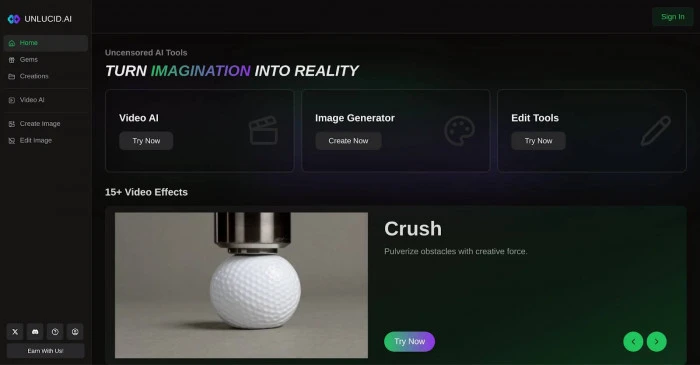
AI image and video generators have become easier to access, but many platforms still place limits on what users can create, how many generations they can make, or how much control they have over their content. Unlucid AI takes a different approach by combining AI image generation, image editing, video creation, and preset video effects inside a browser-based creative platform.
The platform is marketed around “uncensored AI tools” and offers several ways to create or transform visual content without installing desktop software. Its current tools include image generation, image editing, Effects AI, and Video AI.
Another major part of the platform is its Gem-based pricing system. Users can claim free Gems daily, while paid bundles currently start at $8.99 for 120 Gems and go up to $59.99 for 1,250 Gems. The paid bundles are advertised with no watermark and different maximum allowances for images, edits, and videos.
But is Unlucid AI actually good? Is it safe and legitimate? How does its image generator compare with established AI tools, and is the Gem system worth paying for?
This Unlucid AI review looks at the platform’s features, image and video capabilities, pricing, safety, privacy considerations, pros and cons, alternatives, and overall value.
What Is Unlucid AI?
Unlucid AI is a browser-based generative AI platform designed for creating and editing visual content. Instead of requiring users to install specialized software or own a powerful GPU, the platform runs through a web browser.
Its creative suite includes an Unlucid AI image generator, AI-powered image editing, Effects AI for transforming still images into short clips, and a newer Video AI system for generating videos from prompts and optional starting images. The company has also continued updating its effects and video-generation features through its tutorials and product announcements.
The platform supports multiple image styles, including Realistic, Cartoon, 3D, Anime, and Pencil/Sketch. Its image-generation workflow also supports image references and high-resolution upscaling, giving users more control than a simple text-only generator.
What Does Unlucid AI Do?
At a basic level, the platform can be used for:
- AI-generated images
- AI photo editing
- Image transformations
- Image-to-video animation
- Text-to-video generation
- Short creative video effects
- AI art creation
- Social media visuals
- Experimental creative content
This makes it broader than a basic AI image generator.
Rather than focusing on just one type of generation, Unlucid AI attempts to combine several AI creative tools in one place.
Who Is Unlucid AI Designed For?
The platform may be particularly interesting for:
- AI beginners
- Bloggers
- Social media creators
- Meme creators
- Digital artists
- Content creators
- AI enthusiasts
- Users experimenting with image generation
- People looking for less-restricted creative tools
However, professional users should consider the platform’s limitations before making it part of a serious production workflow. Recent independent reviews generally describe Unlucid as more suitable for experimentation and short-form creative work than for highly controlled professional production.
Is Unlucid AI an app or website?
The main experience is browser-based. Users can access the platform online without downloading traditional AI software.
This is convenient because there is no need for a powerful local computer or dedicated GPU.
How Does Unlucid AI Work?
Understanding how Unlucid AI works is relatively simple because its interface is designed around separate creative tools.
Users can choose between image generation, image editing, Effects AI, and Video AI depending on the type of content they want to create.
Creating AI Images
The Unlucid AI image generation workflow begins with a text prompt.
A useful prompt can describe:
- Subject
- Visual style
- Lighting
- Mood
- Composition
- Environment
- Camera perspective
- Desired details
Unlucid’s own prompting guide recommends describing the subject, style, lighting, mood, and composition. The platform currently provides five main styles: realistic, cartoon, 3D render, anime, and pencil.
Users can also upload an image reference to guide the generation process.
This can be helpful when a creator wants the output to maintain a particular visual concept or composition.
Using AI Image Editing
Unlucid AI also works as an AI image editor.
Instead of creating an image entirely from scratch, users can start with an existing image and make AI-assisted changes.
Depending on the available editing workflow, this can include modifications to objects, backgrounds, colors, and other visual attributes.
This makes the platform more flexible than a standard text-to-image generator.
Creating AI Videos
The platform also includes video AI.
According to Unlucid’s product updates, its newer Video AI system supports custom prompting and optional starting images. The company describes it as a separate video-generation system from its preset Effects AI tools.
That distinction is useful.
Effects AI generally gives you predefined transformations, while Video AI is intended to provide more prompt-driven generation.
Effects of AI
Effects AI is one of the more distinctive parts of Unlucid.
Instead of asking the AI to generate an entire video from scratch, a user can upload a suitable starting image and apply a preset effect.
The official tutorials recommend using subjects with clear outlines, good contrast, simple backgrounds, and compositions that match the selected effect.
This means the quality of the starting image can have a noticeable impact on the final result.
Unlucid AI Features
One of the biggest strengths of Unlucid AI is that it combines several types of generative AI functionality.
Unlucid AI Image Generator
The image generator supports multiple styles and allows users to create visual content from text prompts.
The available styles include
- Realistic
- Cartoon
- 3D
- Anime
- Pencil/Sketch
Users can also use reference images and upscale generated results.
For bloggers, social media creators, and casual users, this can make it easier to produce original visual assets without using traditional design software.
Unlucid AI Video Generator
The Unlucid AI video generator is designed for creating short AI-generated clips.
The platform’s newer Video AI functionality supports text descriptions and optional starting images.
This can be useful for:
- Short social media clips
- Visual experiments
- Animated concepts
- AI storytelling
- Promotional ideas
- Image-to-video experiments
It should not automatically be treated as a full professional video-production suite, though.
Unlucid AI Effects
Effects AI is focused on transforming images into short visual clips using predefined effects.
The official website currently advertises more than 15 video effects, while the tutorials provide examples such as Dance, Squish, Flying, Earth Zoom Out, 360 Microwave, and Simply Animate.
This makes Effects AI particularly suitable for novelty content and short-form social media videos.
Unlucid AI Image Editor
The Unlucid AI image editor adds another layer of flexibility.
Instead of starting with a blank canvas, users can modify an existing image using AI.
For someone who already has a photograph or generated image but wants to change specific elements, this can be more practical than generating an entirely new image.
Browser-Based Creative Workflow
Another benefit is accessibility.
There is no need to install local AI models, configure a GPU, or learn complicated creative software.
That makes Unlucid AI approachable for users who simply want to open a website and start experimenting.
Unlucid AI Uncensored Features: What Does It Mean?
The phrase “Uncensored AI” is central to Unlucid’s positioning.
The platform markets itself around fewer content restrictions than many mainstream AI image generators. This is one reason users interested in uncensored AI tools may search specifically for Unlucid.
For some creators, fewer restrictions can provide more freedom for fantasy artwork, experimental concepts, unusual characters, or other visual ideas that might be rejected elsewhere.
However, “uncensored” should not be interpreted as “anything is automatically acceptable.”
Users still need to consider:
- Consent
- Privacy
- Copyright
- Ownership
- Applicable laws
- Platform policies
- Use of real people’s photographs
This is especially important when an AI platform can modify or transform uploaded images.
Independent reviews have also raised concerns around transparency and the risks associated with a platform that places fewer restrictions on generated content.
Therefore, the biggest attraction of Unlucid AI is also one of the areas where users need to exercise the most judgment.
Unlucid AI Pricing: Is It Free?
The Unlucid AI pricing model is based on Gems rather than a traditional monthly subscription.
The official Gems page currently says users can claim free Gems daily and offers three paid bundles.
Is Unlucid AI Free?
Yes, Unlucid AI provides a free entry point through daily Gems.
This is useful because users can explore the platform before purchasing a paid bundle.
However, free access should be viewed as a way to test the platform rather than unlimited high-volume usage.
How Does the Unlucid AI Gems System Work?
Gems function as usage credits.
Different actions consume different amounts of Gems, meaning the number of images or videos you can create depends on the task.
The official pricing page describes the allowances as “up to” a certain number of images, edits, or videos.
That wording is important.
A maximum allowance does not necessarily mean every user will get that exact number of usable final outputs, especially if they regenerate results or make multiple edits.
Unlucid AI 120 Gems
The current 120-Gem bundle is listed at $8.99.
It includes:
- No watermark
- Up to 120 images
- Up to 60 edits
- Up to 12 videos
This can be a reasonable option for someone who only wants to experiment occasionally.
Unlucid AI 450 Gems
The 450-Gem option is currently listed at $29.99.
It provides:
- No watermark
- Up to 450 images
- Up to 225 edits
- Up to 45 videos
- This is more suitable for users who expect to create visual content regularly.
Unlucid AI 1250 Gems
The largest listed bundle contains 1,250 gems and currently costs $59.99.
It offers:
- No watermark
- Up to 1,250 images
- Up to 625 edits
- Up to 125 videos
- For heavy users, this provides the lowest listed cost per Gem among the three paid bundles.
Still, buyers should consider actual usage rather than only the headline numbers.
Unlucid AI Review: Image Quality and Performance
Image quality is where expectations need to be realistic.
Unlucid AI can produce attractive results, especially when prompts are clear and relatively simple. Its multiple styles also make it useful for experimenting with different visual directions.
The platform supports realistic, cartoon, 3D, anime, and pencil-style generations, plus image references and upscaling.
Where Does It Perform Well?
Unlucid can be useful for:
- Concept images
- Social media graphics
- Fantasy artwork
- Character ideas
- Quick illustrations
- Moodboards
- Meme content
- Visual experiments
Where Can It Struggle?
Independent reviews have reported inconsistent results on more complicated scenes, and public evidence around large-scale user satisfaction remains limited.
That means professional users should test the platform with their actual workflow before committing significant money or client projects to it.
For casual users, however, occasional imperfect generations may not be a major problem.
Unlucid AI Video Generator Review
The Unlucid AI video generator is another important part of the platform.
Text-to-Video
The newer video AI system allows users to describe the desired video using a prompt.
This is different from simply applying a preset effect to an image.
The goal is to create a short clip based on the user’s description.
Image-to-Video
Users can also use starting images.
This can be helpful when the visual starting point already exists and the goal is to add motion rather than completely redesign the scene.
Effects AI vs Full Video AI
These two features should not be confused.
Effects AI uses predefined transformations, while Video AI is designed for prompt-based generation.
The platform’s own update history confirms that the older video-effects system was renamed Effects AI while a new prompt-based video AI system was introduced.
For social media creators, Effects AI may actually be easier because the workflow is more predictable.
For users who want more creative control, video AI is potentially more interesting.
Is Unlucid AI Legit or a Scam?
A common search around the platform is “Is Unlucid AI legit?”
Based on the available evidence, Unlucid AI is a functioning online AI platform with publicly accessible tools, pricing information, tutorials, and active product updates.
That does not mean every aspect of the service is equally transparent or that every output will be excellent.
Is Unlucid AI a Scam?
There is not enough evidence to simply label Unlucid AI is a scam.
The website provides working product pages, a Gems system, tutorials, and multiple AI features. Independent review coverage also confirms that the platform is a real browser-based AI service.
However, recent reviews have raised concerns around transparency, privacy, and the relatively limited amount of verified public user feedback.
Therefore, the sensible approach is to test the free functionality first rather than purchasing a large amount of Gems immediately.
What Do Unlucid AI Reviews Say?
Reviews are mixed.
Positive points commonly include:
- Easy browser access
- Low initial cost
- Creative freedom
- Multiple image styles
- Image and video features
- Interesting effects
Negative points include:
- Variable output quality
- Gem usage
- Limited professional controls
- Privacy and trust questions
- Limited independent user-review evidence
This makes Unlucid AI more interesting as an experimental creative platform than as an unquestioned professional production solution.
Is Unlucid AI Safe? Privacy, Content, and Trust
The question “Is Unlucid AI safe?” deserves more attention than a simple yes or no.
Any AI platform that allows users to upload photographs and generate or modify images creates privacy and copyright considerations.
What About Uploaded Photos?
Users should think carefully before uploading:
- Personal photographs
- Client photographs
- Private images
- Identifiable people’s photos
- Copyrighted material
- Sensitive visual content
If you do not have permission to use an image, an AI editor should not be treated as a way around that restriction.
Privacy and Data Handling
Privacy should be reviewed before using any AI creative platform for sensitive material.
Recent independent reviews have specifically identified trust and transparency as areas where potential users should exercise caution.
For casual experimentation, this may be less concerning.
For business or client work, it becomes much more important.
Copyright and Consent
AI tools do not remove normal legal responsibilities.
Users should make sure they have the necessary rights to upload source material and should avoid creating misleading or harmful representations of real people.
A platform being described as “uncensored” does not mean the user is free from legal or ethical obligations.
Unlucid AI Pros and Cons
| Pros | Cons |
| Browser-based and easy to access | Output quality can vary. |
| Daily free Gems | Free usage is limited. |
| Image and video tools in one place | Gem costs can accumulate. |
| Multiple image styles | Professional controls are limited. |
| AI editing capabilities | Public user-review evidence is limited. |
| Many preset effects | Privacy/trust concerns need consideration. |
| No installation required | Not ideal for every business workflow. |
| Relatively low entry price | Results may require retries. |
The Main Advantages
The biggest advantage is convenience.
You can move between image generation, image editing, animation, and video creation without learning several different platforms.
The free Gems also make it easier to test the service before paying.
The Main Disadvantages
The biggest weakness is that creative freedom does not automatically equal professional reliability.
If you need highly consistent images, advanced video controls, predictable output, extensive collaboration features, or strong enterprise assurances, you may find more mature tools better suited to those requirements.
Unlucid AI vs Other AI Generators
Unlucid AI competes in a crowded market.
Unlucid AI vs Midjourney
Midjourney is generally associated with high-quality AI image creation and strong artistic output.
Unlucid’s advantage is its broader combination of image editing, video tools, effects, and less-restricted creative positioning.
If your priority is primarily polished AI artwork, a dedicated image-generation platform may be stronger.
If you want multiple creative functions in one browser tool, Unlucid can be more convenient.
Unlucid AI vs Runway
Runway is strongly associated with professional AI video creation and editing workflows.
Unlucid is simpler and more casual.
For short experiments, social clips, and quick image animation, Unlucid can be attractive.
For complex production work, professional video users may prefer a more comprehensive platform.
Unlucid AI vs Free AI Tools
Unlucid’s free daily Gems make it appealing to people who want to test AI generation without immediately subscribing.
However, free access limits usage, and serious creators may eventually need paid credits.
Best Unlucid AI Alternatives
The best Unlucid AI alternatives depend on what you actually want to create.
For AI Images
A dedicated AI image generator may be a better choice if your primary goal is maximum image quality, style consistency, and advanced prompting.
For Professional AI Video
Creators focused on serious video production should compare Unlucid with established AI video platforms that provide stronger timeline, editing, and production controls.
For Social Media Content
If your main goal is Instagram, TikTok, YouTube Shorts, or similar content, a platform focused specifically on social media workflows may provide more useful templates and editing options.
For Professional Client Work
Businesses should prioritize tools with clear commercial terms, privacy documentation, reliable support, and predictable output.
Unlucid can still be tested, but it should not automatically be the first choice for sensitive client projects.
Who Should Use Unlucid AI?
Unlucid AI is probably most suitable for users who value experimentation and convenience.
Good For
- AI beginners
- Bloggers
- Social media creators
- Meme creators
- Hobby artists
- AI enthusiasts
- Short-form video creators
- People experimenting with AI image generation
- Users who want browser-based AI tools
Less Suitable For
- Enterprise teams
- Highly regulated industries
- Sensitive client projects
- Professional filmmaking
- Long-form video production
- Users requiring extensive collaboration
- Workflows that need strong data governance
The platform is best thought of as a creative sandbox rather than a complete replacement for a professional design or video-production studio.
How to Use Unlucid AI | Beginner Guide
If you are wondering how to use Unlucid AI, the process is relatively straightforward.
Step 1: Open the Website
Open the Unlucid AI website in your browser.
Step 2: Choose Your Tool
Depending on your goal, select:
- Create Image
- Edit Image
- Effects AI
- Video AI
Step 3: Write a Clear Prompt
For image generation, describe the subject, style, lighting, mood, and composition.
A detailed prompt generally gives the model more information to work with.
Step 4: Generate or Edit
Start the process and review the result.
Don’t assume the first generation will always be the best one.
Step 5: Experiment With Variations
Try different prompts, styles, compositions, or reference images.
Step 6: Monitor Your Gems
Because Unlucid uses a credit system, keep an eye on your remaining Gems.
Repeated generations can consume credits faster than the headline maximum allowances suggest.
Step 7: Export Your Final Creation
If you need watermark-free output, check the applicable paid option.
The official paid bundles currently advertise no watermark.
Frequently Asked Questions About Unlucid AI
What is Unlucid AI?
Unlucid AI is a browser-based generative AI platform for creating and editing images, generating videos, and applying AI-powered visual effects.
Is Unlucid AI free?
Yes. Unlucid provides daily free Gems, while additional Gems can be purchased through paid bundles.
Is Unlucid AI legit?
Unlucid AI appears to be a functioning AI creative platform with active tools, tutorials, pricing, and product updates. However, users should consider the limited amount of independent user-review evidence and evaluate privacy and transparency before using it for sensitive work.
Is Unlucid AI safe?
The answer depends on how it is used. Users should be careful with personal, copyrighted, or sensitive images and review the platform’s policies before uploading important material.
Is Unlucid AI an image generator?
Yes. The Unlucid AI image generator supports multiple styles, including realistic, cartoon, 3D, anime, and Pencil, as well as image references and upscaling.
Does Unlucid AI generate videos?
Yes. Unlucid offers Video AI for prompt-based video generation and Effects AI for applying preset animations and transformations to images.
Does Unlucid AI have an app?
The primary experience is browser-based rather than a traditional desktop AI application. This means users can access the creative tools online without installing local AI software.
How does Unlucid AI pricing work?
Unlucid uses Gems rather than a traditional monthly subscription. The official page currently lists 120 Gems for $8.99, 450 Gems for $29.99, and 1,250 Gems for $59.99.
What are Unlucid AI Gems?
Gems are usage credits used for the platform’s AI generation and editing features. Different types of content can consume different amounts of Gems.
How much are 120 Unlucid AI Gems?
The official price for 120 Gems is currently $8.99, and the package advertises up to 120 images, 60 edits, or 12 videos.
How much are 450 Unlucid AI Gems?
The 450-Gem package is currently listed at $29.99 and advertises up to 450 images, 225 edits, or 45 videos.
How much are 1,250 Unlucid AI Gems?
The 1,250-Gem package is currently listed at $59.99 and advertises up to 1,250 images, 625 edits, or 125 videos.
Does Unlucid AI have free credits?
Yes. The platform currently advertises free Gems that users can claim daily. The exact free allowance can change, so users should check the live platform.
What are the best Unlucid AI alternatives?
Alternatives depend on your goal. Dedicated AI image generators can be better for advanced image quality, while professional AI video platforms can be better for production workflows. Unlucid is more attractive when you want several creative functions in one browser-based platform.
Is Unlucid AI good for professional use?
It can be useful for brainstorming, concepts, social media content, and quick experiments. For sensitive client work, enterprise workflows, or professional filmmaking, users should compare its privacy, reliability, controls, and support against more established platforms first.
Final Verdict: Is Unlucid AI Worth It?
So, is Unlucid AI worth it?
For the right user, it can be.
The platform’s biggest strengths are its accessibility, broad collection of creative tools, daily free Gems, image-generation styles, AI editing, video generation, and Effects AI. It is particularly convenient for creators who want to experiment with images and short videos without installing complicated software.
Its pricing is also relatively easy to understand. The current paid bundles start at $8.99 and go up to $59.99, with no-watermark output advertised on paid packages.
However, Unlucid AI is not necessarily the best choice for every creator.
The Gem model means frequent retries can increase your actual cost, while independent reviews have raised questions about output consistency, privacy, transparency, and professional suitability.
For casual creators, bloggers, social media users, and AI enthusiasts, Unlucid AI is worth trying, especially through its free option.
For businesses and professional creators, the better approach is to test it with non-sensitive projects first and compare the results against established AI image and video platforms.
Overall verdict: Unlucid AI is an interesting and flexible AI creative platform, but its biggest value is experimentation and convenience rather than replacing a complete professional creative workflow. As with any generative AI tool, users should judge it on actual output quality, cost, privacy, and reliability—not simply on the number of features it advertises.
SEO note: Is article mein Unlucid AI, Unlucid AI review, Unlucid AI pricing, Unlucid AI free, Unlucid AI Gems, Unlucid AI image generator, Unlucid AI video generator, Unlucid AI uncensored, Is Unlucid AI legit, Is Unlucid AI safe, Unlucid AI alternatives aur related semantic terms ko different sections mein distribute kiya gaya hai, taa-ke exact-match repetition unnatural na lage.