
AI video generation has become one of the fastest-growing areas of artificial intelligence. Instead of spending hours learning complex video editing software, creators can now use an AI video generator to transform images, prompts, and ideas into short videos within seconds.
MotionMuse AI is one of the platforms targeting this growing market. Rather than trying to replace every professional video editor, MotionMuse AI focuses heavily on creating short animated videos from images. The platform currently promotes 4–6 second AI-generated clips, ready-made templates, custom prompts, and access to more than 450 AI models.
That makes MotionMuse AI interesting for social media creators, bloggers, marketers, digital artists, and anyone who wants to turn static visual content into something more engaging.
But is MotionMuse AI actually worth using?
In this MotionMuse AI review, we will look at how the platform works, its main features, video quality, pricing, free plan, credits, safety, user experience, pros and cons, alternatives, and the situations where it makes the most sense.
The goal is to give you a balanced view rather than simply calling it the best AI video generator. Like most AI-powered tools, MotionMuse AI has clear strengths, but it also has limitations that users should understand before paying for a subscription.
What Is MotionMuse AI?
MotionMuse AI is an AI-powered video creation platform that focuses primarily on turning still images into short animated videos.
The concept is simple. You provide an image, select an animation template or write a custom prompt, and the platform uses AI to generate a short video based on your input.
According to the current MotionMuse AI website, users can create approximately 4–6 second videos using prepared templates or custom prompts. The platform also advertises access to more than 450 AI models.
This makes MotionMuse particularly interesting for people who already have images but want to give those images movement.
For example, a creator could take a product photograph and turn it into a short promotional animation. A social media creator could animate an illustration for an Instagram Reel. A blogger could turn a static featured image into a short visual clip.
What Does MotionMuse AI Do?
The main purpose of the MotionMuse AI app is automated video creation.
Instead of manually adding keyframes, motion effects, transitions, and other animation elements, users can allow AI to generate movement from an existing image.
The platform also promotes templates, custom prompts, AI-generated animations, and different creation options.
This makes it more accessible to beginners who may not have professional video-editing skills.
Who Is MotionMuse AI For?
MotionMuse AI can be useful for:
- Content creators
- Social media managers
- Bloggers
- Digital marketers
- Small businesses
- Artists
- Designers
- Affiliate marketers
- TikTok creators
- Instagram creators
- YouTube Shorts creators
- AI enthusiasts
It can also be useful for people who want to experiment with AI-generated content without learning complicated editing software.
What Makes MotionMuse Different?
The main difference is its focused workflow.
Many AI video platforms try to cover everything from text-to-video and cinematic generation to advanced editing. MotionMuse AI has a particularly strong emphasis on image-to-video generation and short-form visual content.
That narrower focus can actually be an advantage for beginners because the workflow is easier to understand.
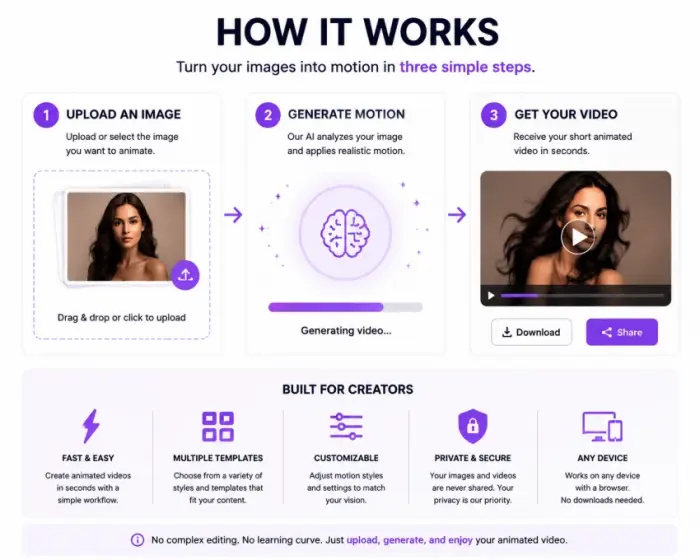
How Does MotionMuse AI Work?
One of the biggest advantages of MotionMuse AI is its relatively simple workflow.
The current platform describes a five-step process: create an account, upload an image or choose a template, enter a custom prompt or select an animation style, generate the video, and then download or share the result.
Step 1: Sign Up for MotionMuse AI
The first step is creating a MotionMuse AI account.
The platform currently provides a free starting option, so users can test the service before committing to a paid subscription.
This is useful because AI video generation quality can vary depending on the source image and prompt.
Step 2: Upload an Image
The next step is selecting the image you want to animate.
Depending on your project, this could be:
- A portrait
- Product photography
- Artwork
- Character artwork
- Marketing graphics
- Illustrations
- Social media images
The quality of the original image matters because AI animation works from the visual information available in the source.
Step 3: Choose a Template or Custom Prompt
MotionMuse AI gives users the option of using prepared templates or creating animations through custom prompts.
Templates are useful for beginners who want a quick result.
Custom prompts provide more creative control because you can describe the movement or visual effect you want.
For example, instead of simply selecting a generic animation, a user could describe a camera movement, character motion, environmental effect, or product animation.
Step 4: Generate the Video
After choosing your image and instructions, you can start the AI video generation process.
MotionMuse AI is designed around short clips, with the platform currently advertising results in the 4–6 second range.
The short format makes the tool especially suitable for social media content.
Step 5: Download and Share
Once the video has been generated, users can download it and potentially use it for:
- Instagram Reels
- TikTok
- YouTube Shorts
- Promotional posts
- Website content
- Marketing campaigns
- Visual storytelling
This makes the platform more of a quick content creation tool than a full professional video-production suite.
MotionMuse AI Features
The features are an important part of any MotionMuse AI review, especially because users need to understand what they are actually paying for.
AI Image-to-Video Generation
The core feature is MotionMuse AI image-to-video generation.
This allows users to take a static image and add AI-generated movement.
For creators who already have a library of images, this can be a convenient way to produce additional visual content without starting from scratch.
AI Video Generation
MotionMuse AI can generate short videos based on images and instructions.
The objective is not simply to add a basic zoom effect. AI video generation attempts to create movement that matches the content of the original image and the user’s instructions.
The quality of the result can depend heavily on the source image and prompt.
Text-to-Video
The broader MotionMuse experience also advertises AI video-generation capabilities beyond simply uploading an image.
Text-to-video tools are useful when the creator has an idea but does not already have a finished visual asset.
Instead of manually creating a scene, the user can describe what they want and let an AI system attempt to produce the visual content.
Image-to-Image
Image transformation is another useful category for AI content creation.
Instead of only animating a picture, creators may want to produce variations, styles, or modified versions of existing images.
This can be helpful when developing creative assets for social media or marketing.
MotionMuse AI Templates
Templates are particularly useful for beginners.
Rather than writing detailed prompts for every project, users can choose from prepared animation styles and modify their content.
The platform currently says its paid plans unlock all templates and that the template library is updated regularly.
Templates can reduce the learning curve and make the platform easier to use.
Custom Prompts
For more advanced creators, custom prompts offer additional control.
A well-written prompt can help communicate:
- Desired movement
- Camera direction
- Subject motion
- Environmental effects
- Animation style
- Overall visual mood
Prompt quality is important with almost every AI-powered tool, and MotionMuse is no exception.
450+ AI Models
One of MotionMuse AI’s biggest advertised features is access to 450+ AI models.
If that model library remains available across the platform, it gives creators a broad range of possibilities for experimentation.
However, users should remember that the number of models alone does not determine output quality.
A smaller selection of highly optimized models can sometimes be more useful than hundreds of options that produce inconsistent results.
AI Training Tools
Paid MotionMuse AI plans currently include AI training tools. Basic, Pro, and Premium plans all list this feature.
For creators who want more control over their AI workflow, training-related features can potentially make the platform more useful than a basic image-animation tool.
High-Speed Generation Queue
Paid plans also provide access to high-speed generation queues.
The current plans advertise three concurrent high-speed videos on Basic, ten on Pro, and fifteen on Premium.
This can matter for professional creators who generate content at scale.
A user producing one or two clips occasionally may not notice much difference, while someone creating dozens of visual assets can benefit more from faster throughput.
MotionMuse AI Video Quality: What Can You Expect?
Video quality is probably more important than the number of features.
After all, an AI video generator can have hundreds of models and templates, but users ultimately want attractive, usable videos.
Independent reviews have generally described MotionMuse as a focused image-to-video tool rather than a complete professional video-production platform. One recent review described its strength as turning still images into short animated clips with relatively little setup.
Animation Quality
The output can be useful for simple visual motion.
Portraits, product images, artwork, and simple scenes are generally easier for an AI system to animate than extremely complicated scenes with many interacting objects.
The more complicated the source image and requested movement become, the more likely users may encounter inconsistent results.
Video Duration
One of MotionMuse’s clearest limitations is video length.
The platform currently focuses on approximately 4–6 second videos.
That is excellent for:
- Short social media clips
- Reels
- TikTok content
- YouTube Shorts elements
- Product teasers
- Animated thumbnails
- Quick promotional visuals
But it is not ideal for creators looking to generate complete long-form videos from one prompt.
Creative Control
MotionMuse provides a combination of templates and custom prompts.
Templates make the process easier, while custom prompts give users more control.
Still, users should not expect the same level of frame-by-frame control available in professional video editing software.
Where MotionMuse AI Works Best
The platform makes the most sense when you need quick visual content.
For example:
A photographer can animate a product photograph.
A blogger can turn a featured image into a short visual.
A social media manager can create several short clips from existing graphics.
A designer can experiment with motion effects without opening a complex editing application.
That is where MotionMuse AI has a practical advantage.
MotionMuse AI Pricing: Is It Affordable?
MotionMuse AI pricing follows a freemium model.
The platform currently offers a free tier plus Basic, Pro, and Premium subscription plans.
MotionMuse AI Free Plan
The current free offering starts users with 20 credits, and the platform’s free-credit page says users can receive an additional five credits daily.
The free option is useful for testing the platform before spending money.
Users can experiment with templates, prompts, generation quality, and workflow.
This is one of the strongest reasons to test MotionMuse AI before buying a subscription.
MotionMuse AI Basic
The Basic plan is currently listed at $9.99 per month, or $4.99 per month when billed annually, with 300 monthly credits.
It includes:
- 300 monthly credits
- All templates
- Three-video high-speed generation queue
- AI training tools
- Priority over free users
For hobbyists and new creators, this is likely the most logical paid tier.
MotionMuse AI Pro
The Pro plan is listed at $29.99 monthly, or $14.99 per month with annual billing, and provides 1,500 monthly credits.
It also increases the high-speed generation queue to ten videos.
This plan is aimed more toward professionals and creators producing content at scale.
MotionMuse AI Premium
The Premium plan is currently listed at $49.99 monthly, or $24.99 per month with annual billing, and provides 3,000 monthly credits.
It also provides a 15-video high-speed generation queue.
This tier is aimed at heavy users, studios, and creators who need significantly more monthly generation capacity.
Are MotionMuse AI Credits Worth It?
The credit system is something users should pay attention to.
A low monthly subscription price can look attractive, but the actual value depends on how quickly credits are consumed.
If you generate only occasionally, the free or Basic plan may be sufficient.
If you generate many variations while testing prompts, credits can disappear much faster.
Therefore, users should evaluate cost per usable video, not just the monthly subscription price.
Is MotionMuse AI Free?
Yes, MotionMuse AI currently has a free option.
The platform advertises 20 starter credits, while its dedicated free-credit page says users can receive five additional credits each day.
The free plan is useful for people who want to test:
- Video quality
- Generation speed
- Templates
- Custom prompts
- User interface
- AI animation results
You do not necessarily need to purchase a subscription immediately.
For someone who only wants occasional AI-generated videos, the free tier may be enough to experiment with the service.
However, frequent creators will probably need a paid plan because higher tiers provide substantially more monthly credits and faster generation queues.
Is MotionMuse AI Safe and Legit?
The question “Is MotionMuse AI safe?” should be considered separately from whether the tool is useful.
MotionMuse AI’s current website provides privacy and terms information, and it states that it collects the minimum information needed to provide the service and does not sell user data to third parties.
That is a positive sign, but users should still review the current privacy policy and terms before uploading important or sensitive content.
Is MotionMuse AI Legit?
There are several signs that MotionMuse AI is operating as an active AI video-generation service, including its website, subscription plans, free credits, templates, and published documentation.
However, “legit” should not be interpreted as “every generation will be perfect.”
A legitimate AI service can still have:
- Technical issues
- Variable output quality
- Credit limitations
- Feature restrictions
- Pricing changes
Users should therefore judge the platform based on its actual functionality and their own experience.
MotionMuse AI Privacy
Privacy is particularly important for an AI image-to-video service because users upload images to the platform.
Before uploading commercial assets, personal photographs, confidential designs, or client material, users should check the latest terms and privacy policy.
Also consider whether you have permission to upload the images in the first place.
Is MotionMuse AI a Scam?
There is not enough reason to simply label MotionMuse AI a scam based on the existence of criticism or complaints.
Some independent reviews have raised concerns about credits, pricing complexity, and output limitations, but those are different from evidence that a service is fraudulent.
The better approach is to test the free tier first and evaluate whether the results justify the paid cost.
MotionMuse AI Reviews: What Are Users Saying?
Looking at MotionMuse AI reviews is useful because official marketing naturally emphasizes the positive side of a product.
Independent reviews provide a more balanced picture.
A recent three-month review described MotionMuse as inexpensive and easy to start with, particularly highlighting its low annual-billing prices and straightforward image-to-video workflow.
Another independent review described the platform as fast and easy to understand but emphasized that its narrow image-to-video focus can become limiting for users who want longer storytelling or deeper editing control.
What Users May Like
Commonly highlighted strengths include:
- Easy setup
- Simple workflow
- Fast generation
- Affordable entry-level pricing
- Image-to-video functionality
- Templates
- Short-form content creation
Common Complaints
Some third-party reporting has highlighted concerns about:
- Credits being consumed quickly
- Output inconsistency with complex prompts
- Questions around subscription or billing clarity
- Limitations caused by short video duration
These points are important because they show that MotionMuse is not necessarily the right choice for every creator.
Overall User Experience
The overall picture is fairly straightforward:
MotionMuse AI is strongest when you need a quick animated clip from an existing image.
It becomes less compelling when you need:
- Long videos
- Complex storytelling
- Detailed editing
- Professional timeline control
- Extensive post-production
That distinction is important when comparing it with larger AI video platforms.
MotionMuse AI Pros and Cons
Pros
- Easy-to-understand workflow
- Free option for testing
- Image-to-video generation
- Ready-made templates
- Custom prompts
- Large advertised AI model selection
- Useful for social media content
- Affordable entry-level paid plan
- High-speed generation queues on paid plans
- Suitable for beginners
Cons
- Short 4–6 second output focus
- Credit-based generation
- Heavy usage can become more expensive
- Output quality can vary
- Complex prompts may produce inconsistent results
- Not a replacement for professional video editing software
- Limited suitability for long-form storytelling
- Users need to understand the credit system before upgrading
MotionMuse AI vs Other AI Video Generators
Comparing MotionMuse AI with other AI video generators depends on what you need.
MotionMuse’s strongest use case is short image animation.
If your primary goal is turning an existing photograph, artwork, or product image into a short moving clip, MotionMuse’s focused workflow can be convenient.
Broader AI video platforms may offer more options for:
- Text-to-video
- Longer clips
- Cinematic scenes
- Character consistency
- Advanced controls
- More complex storytelling
MotionMuse AI vs Professional Video Editors
This comparison is even clearer.
MotionMuse AI is an AI content-generation tool.
Professional editors provide timeline-based control over:
- Cuts
- Audio
- Transitions
- Effects
- Color
- Keyframes
- Multiple tracks
Therefore, MotionMuse should not be viewed as a direct replacement for professional video editing software.
Instead, it can be used earlier in the workflow to create visual assets that are then edited elsewhere.
Best MotionMuse AI Alternatives
If MotionMuse AI does not meet your requirements, there are several categories of alternatives worth considering.
Advanced AI Video Generators
These are better suited to users who want more advanced text-to-video capabilities, longer sequences, cinematic generation, or complex AI video workflows. If you want to explore a platform built around this kind of broader AI capability, Unlucid AI is one option worth checking out for users who need more than short image animation.
Image-to-Video AI Alternatives
If your primary objective is animating still images, compare MotionMuse with other specialized image-to-video tools.
Pay attention to:
- Maximum video duration
- Motion quality
- Prompt control
- Image consistency
- Credits
- Export quality
- Pricing
AI Animation Tools
Dedicated AI animation platforms can be useful for artists, designers, and marketers who need more control over motion. Tools like WSUP AI fall into this category and can be worth a look if you want a different take on AI-assisted content creation.
Professional AI-Assisted Editors
If you need both AI generation and traditional editing, an AI-powered video editor may be a better option.
The best MotionMuse AI alternative ultimately depends on whether you prioritize simplicity, output quality, advanced control, long-form generation, or price.
Who Should Use MotionMuse AI?
MotionMuse AI is best suited to creators who need fast, short visual content.
Best For
Beginners:
The simple workflow makes it easier to start with AI video creation.
Social Media Creators:
Short clips can work well for TikTok, Instagram Reels, and YouTube Shorts.
Bloggers:
Existing article images can be converted into more engaging visual assets.
Digital Marketers:
Product and promotional images can be turned into short marketing videos.
Small Businesses:
Businesses can experiment with AI-generated content without investing heavily in professional animation.
Artists and Designers:
Static artwork can become animated visual content.
Not Ideal For
MotionMuse may not be the best option for:
- Filmmakers
- Long-form video creators
- Advanced editors
- Users needing frame-by-frame control
- Professional productions requiring extensive post-production
For those users, a broader AI video platform or professional editing application may provide more control.
Frequently Asked Questions About MotionMuse AI
What is MotionMuse AI?
MotionMuse AI is an AI-powered content creation platform focused heavily on turning images into short animated videos. The platform currently advertises 4–6 second generation, templates, custom prompts, and more than 450 AI models.
Is MotionMuse AI free?
Yes. MotionMuse currently offers a free tier with 20 starting credits, and its free-credit page says users can receive five additional credits daily.
How does MotionMuse AI work?
Users can sign up, upload an image or select a template, enter a custom prompt or choose an animation style, generate the video, and then download or share the result.
Can MotionMuse AI turn images into videos?
Yes. Image-to-video generation is one of the platform’s main features.
Does MotionMuse AI support text-to-video?
The MotionMuse ecosystem also promotes AI video generation from prompts, although the platform’s strongest positioning remains short image-to-video creation.
Does MotionMuse AI have templates?
Yes. The service offers prepared templates, with paid plans currently advertising access to the full template collection.
How many free credits does MotionMuse AI provide?
The current free offering starts with 20 credits. The dedicated free-credit page also advertises five additional credits per day.
How much does MotionMuse AI cost?
Current US pricing lists Basic at $9.99 monthly or $4.99/month with annual billing, Pro at $29.99 monthly or $14.99/month annually, and Premium at $49.99 monthly or $24.99/month annually.
What is the MotionMuse AI Basic plan?
The Basic plan includes 300 monthly credits, all templates, a three-video high-speed generation queue, AI training tools, and priority over free users.
What is the MotionMuse AI Pro plan?
The Pro plan currently includes 1,500 monthly credits and a ten-video high-speed generation queue, along with the other paid features.
What is the MotionMuse AI Premium plan?
Premium provides 3,000 monthly credits and a 15-video high-speed generation queue and is positioned for heavy users and studios.
Is MotionMuse AI worth it?
It can be worth considering if your main goal is creating short animated clips from images quickly. It is less suitable if you need long-form video generation or advanced editing.
Is MotionMuse AI legit?
The service appears to operate as an active AI video-generation platform with published pricing, plans, features, and documentation. Users should still test the free tier and review the current terms before purchasing.
Is MotionMuse AI safe?
The platform provides privacy information and states that it does not sell user data to third parties. Users should nevertheless review the current privacy policy before uploading sensitive or confidential material.
Is MotionMuse AI good for beginners?
Yes. Its template-based workflow and straightforward image-to-video process make it relatively accessible to beginners.
How long are MotionMuse AI videos?
The platform currently promotes short 4–6 second videos.
Can I use MotionMuse AI for social media?
Yes. Short AI-generated videos can be useful for TikTok, Instagram Reels, YouTube Shorts, promotional posts, and other short-form content.
Can MotionMuse AI replace professional video editing software?
Not completely. MotionMuse is primarily an AI generation tool, while professional video editors provide detailed timeline editing and post-production controls.
What are the best MotionMuse AI alternatives?
The best alternatives depend on your needs. Advanced AI video generators are better for complex scenes and longer videos, while specialized image-to-video platforms may be better if image animation is your main goal.
Final Verdict Is MotionMuse AI Worth It?
So, is MotionMuse AI worth using?
For the right user, yes.
MotionMuse AI has a clear strength: turning static images into short AI-generated videos without requiring advanced video-editing skills.
Its template system makes the platform approachable for beginners, while custom prompts give experienced users additional creative control. The free tier also makes it possible to test the service before purchasing a subscription.
The pricing structure is another advantage. The current Basic, Pro, and Premium plans provide increasing monthly credit allowances and faster generation queues, making the platform potentially useful for both casual creators and higher-volume users.
However, there are important limitations.
The biggest is the platform’s focus on short 4–6 second videos. That is excellent for social media content, product teasers, animated images, and quick visual storytelling, but it is not enough for users looking to produce complete long-form videos.
The credit system is another factor to consider. Heavy users should monitor how quickly their credits are consumed before deciding which subscription provides the best value.
Overall, MotionMuse AI is best viewed as a focused AI image-to-video generator rather than a complete professional video production platform. Independent reviews have similarly highlighted its ease of use and focused workflow while pointing out limitations around longer storytelling and deeper editing.
If your goal is quick, attractive, short-form AI video creation, MotionMuse AI is worth testing. If you need cinematic long-form generation, detailed editing, or advanced production control, you may be better served by a broader AI video generator or professional editing workflow.