
Running a restaurant involves much more than taking orders and generating bills. Owners and managers need to keep an eye on sales, inventory, staff activity, online orders, payments, and the performance of individual outlets. When this information is spread across different systems or maintained manually, getting a clear picture of the business can become difficult.
This is where the Petpooja Dashboard comes into the picture.
Petpooja is a restaurant management and POS platform designed to bring several operational activities into one system. Its dashboard and reporting features give restaurant owners and managers a way to review business information, understand sales trends, monitor inventory, and compare outlet performance.
Petpooja currently promotes more than 40 reports covering areas such as sales, inventory, online orders, staff performance, and other restaurant operations. It also offers customizable reporting so businesses can focus on the information most relevant to their operations.
But a long list of reports does not automatically make a dashboard useful.
The real question is how well the dashboard fits into the daily routine of a restaurant.
Can an owner quickly understand how the business performed today? Can a manager identify which products are selling? Can a multi-outlet business compare branches? Can staff permissions be controlled properly?
This Petpooja Dashboard walkthrough looks at these questions from a practical perspective.
What Is the Petpooja Dashboard?
The Petpooja restaurant dashboard is the management and reporting side of the Petpooja ecosystem. It allows authorized users to access business information generated through restaurant operations.
Depending on the setup, restaurant owners and managers can use Petpooja to monitor areas such as:
- Sales
- Orders
- Payments
- Inventory
- Menu performance
- Staff activity
- Online orders
- Expenses
- Outlet performance
- Business reports
The idea is simple: instead of manually collecting information from bills, spreadsheets, and different operational systems, restaurant managers can use a centralized platform to review their business data.
What Is the Petpooja Dashboard Used For?
The dashboard can be useful for both day-to-day monitoring and longer-term decision-making.
For example, an owner might use it to answer questions such as
Which menu items sold the most today?
How much revenue did the restaurant generate?
Which payment method was used most frequently?
How did one outlet perform compared with another?
Are inventory levels becoming a problem?
Which staff members handled the most activity?
These questions are more useful than simply looking at one overall sales number.
Petpooja Dashboard vs Petpooja POS
The terms “Petpooja POS” and “Petpooja Dashboard” can sometimes be confused.
The POS is more directly involved with restaurant transactions and operations such as billing, order entry, and KOT management.
The dashboard is more focused on monitoring, reporting, and management.
In simple terms:
POS = where restaurant operations happen
Dashboard = where management reviews what happened
Both are connected, but they serve different purposes.
Petpooja Dashboard Login: How to Access the System
One of the first things restaurant owners need to understand is how Petpooja dashboard login works.
Petpooja has different products and services, so the exact login experience can depend on which Petpooja product or account a restaurant is using.
Petpooja Login
A typical login process involves opening the appropriate Petpooja portal and entering the account credentials provided to the authorized user.
Once authenticated, the user can access the functions available to their account.
The available options may differ depending on whether the person is an owner, manager, or staff member.
Petpooja Owner Login
Restaurant owners generally need broader visibility than front-of-house employees.
An owner may need access to:
- Sales reports
- Inventory information
- Staff activity
- Business performance
- Outlet comparisons
- Financial reports
- Administrative settings
This is why permissions are important.
Giving every employee complete access to restaurant data can create unnecessary operational and security risks.
Petpooja Staff Login
Staff members generally need access to the functions required for their particular role.
For example, a cashier may need billing access, while a kitchen employee may primarily interact with order and KOT information.
The objective is to provide people with enough access to perform their jobs without unnecessarily exposing administrative functions.
What If Petpooja Dashboard Login Does Not Work?
If a Petpooja dashboard login fails, the first steps should be basic troubleshooting.
Check that:
- The correct login portal is being used
- Username or credentials are entered correctly
- The account is active
- Internet connectivity is working
- The browser is functioning properly
- Password reset options are available if required
If the problem continues, contacting Petpooja support is preferable to repeatedly attempting incorrect credentials.
A First Look at the Petpooja Dashboard
Once inside the system, the usefulness of the dashboard depends heavily on how a restaurant has configured its account.
A well-configured restaurant should be able to use the available information to understand what is happening across its operations.
What Information Matters Most?
A restaurant owner usually does not need to examine every report every morning.
The most important information often includes:
- Today’s sales
- Order volume
- Payment breakdown
- Popular menu items
- Inventory concerns
- Discounts
- Cancellations
- Outlet performance
This creates a practical distinction between available information and useful information.
A dashboard may contain dozens of reports, but a restaurant owner needs to identify which reports actually help with decisions.
Why Restaurant Dashboards Matter
Restaurants generate large amounts of operational data every day.
Every bill creates information.
Every order affects inventory.
Every cancellation affects sales.
Every staff transaction contributes to an operational record.
Without a centralized system, reviewing all of this information manually can take considerable time.
A restaurant dashboard can turn these individual transactions into summaries and reports that are easier to understand.
Petpooja Sales Dashboard and Revenue Tracking
Sales reporting is one of the most important reasons restaurant owners use POS systems.
The Petpooja sales dashboard can help businesses review restaurant sales and understand performance over different periods.
Daily Sales Report
A Petpooja daily sales report can provide a quick overview of the day’s performance.
Instead of waiting until the end of a month to understand revenue trends, restaurant managers can review sales information regularly.
Daily reporting can help identify unusual changes.
For example, if Tuesday sales are significantly lower than the normal Tuesday average, the owner may want to investigate whether there was:
- Lower customer traffic
- A temporary closure
- A technical issue
- Reduced online ordering
- A stock problem
- A promotional change
The report itself does not explain why sales changed.
It gives the business a starting point for investigation.
Sales by Payment Method
Restaurants commonly accept multiple payment methods.
A sales report can therefore become more useful when revenue is separated by payment type.
Examples include:
- Cash
- Card
- UPI
- Online payments
Payment reporting is also useful during reconciliation.
If the POS reports one amount while the payment settlement shows another, the difference needs to be investigated.
Sales by Order Type
Restaurants may have several channels:
- Dine-in
- Takeaway
- Delivery
- Online ordering
Comparing these channels can reveal where customers are actually generating revenue.
For example, a restaurant might discover that weekday dine-in sales are strong while delivery dominates during weekends.
That information can influence staffing, promotions and inventory planning.
Item-Wise Sales
Item-level sales data is particularly useful for menu decisions.
A restaurant may discover that:
- A small number of dishes generate most orders
- Certain products sell only at specific times
- Some menu items rarely sell
- Promotional products perform better than expected
This information can be used when reviewing the menu.
Petpooja Reports: What Can You Track?
Petpooja promotes a wide range of reports for restaurant operations.
The available reporting ecosystem covers several areas rather than focusing only on revenue.
Petpooja Sales Reports
Sales reports help owners understand revenue and transaction activity.
They can be used to examine performance over different dates, outlets, and order types.
Petpooja Inventory Reports
Inventory reports are important because food businesses need to control stock carefully.
Too much inventory can increase waste.
Too little inventory can result in unavailable menu items.
Petpooja Staff Reports
Staff-related reporting can help managers understand activity and operational performance.
This becomes particularly useful in restaurants with multiple shifts.
Online Order Reports
Restaurants that receive online orders need to understand how much business comes from these channels.
Online order reports can help compare digital sales with other order types.
Expense Reports
Revenue alone does not tell the complete story.
Restaurants also need to understand expenses.
Expense reporting can therefore provide additional context when reviewing profitability.
Outlet-Wise Reports
For restaurant groups, outlet-wise reporting becomes particularly important.
Instead of looking at the company as one large number, owners can compare individual branches.
Petpooja Inventory Dashboard
Inventory is one of the areas where restaurant technology can have a direct impact on daily operations.
A restaurant can generate strong sales and still lose money if ingredients are poorly managed.
Tracking Restaurant Stock
The Petpooja inventory management functionality can help restaurants maintain information about stock and ingredients.
The objective is not simply to know how much stock exists.
Managers need to understand how stock moves.
A good inventory process connects:
Purchasing → Ingredients → Recipes → Orders → Consumption → Remaining Stock
Recipe and Ingredient Mapping
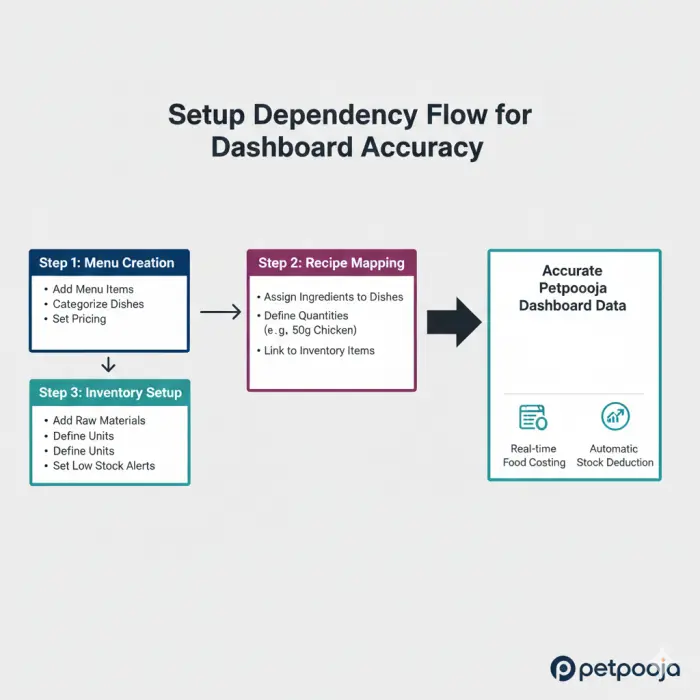
Recipe mapping is an important part of inventory accuracy.
If a restaurant sells a burger, the system needs to understand which ingredients are associated with that menu item.
If the recipe data is incorrect, inventory calculations can also become inaccurate.
This is one of the most important practical limitations of restaurant management software:
The system can only be as accurate as the information entered into it.
Low Stock Monitoring
Restaurants can use inventory information to identify products that may require replenishment.
This can help reduce situations where a customer orders an item only to discover that the restaurant has run out of a required ingredient.
Food Cost and Inventory Accuracy
Inventory management can also support food cost analysis.
But again, the numbers need proper setup.
Incorrect purchase prices, missing ingredients, or inaccurate recipes can distort the results.
For that reason, restaurant managers should regularly review inventory settings instead of assuming the system will remain accurate automatically.
Petpooja Billing and KOT Management
Restaurant operations happen quickly, especially during lunch and dinner rushes.
Billing and kitchen communication therefore need to work together.
Petpooja Billing
The POS environment handles the transaction side of restaurant operations.
A typical flow might look like this:
Customer Order → POS Entry → KOT → Kitchen Preparation → Bill → Payment
The exact workflow can vary depending on the restaurant’s configuration.
Petpooja KOT
KOT stands for Kitchen Order Ticket.
The purpose of a KOT system is to communicate food orders from the ordering area to the kitchen.
Digital KOT management can reduce the need for manually passing handwritten orders between staff members.
Table Management
For dine-in restaurants, table management is another important operational area.
Managers may need to monitor:
- Available tables
- Occupied tables
- Active orders
- Open bills
- Table transfers
- Split bills
During busy periods, this information becomes particularly valuable.
Online Orders
Restaurants increasingly operate across several channels.
A restaurant may receive:
- Walk-in customers
- Phone orders
- Website orders
- Delivery orders
- Third-party platform orders
Bringing order information into a common workflow can make management easier.
Petpooja Dashboard for Staff Management
A restaurant’s technology system should not only track customers and sales.
It should also help managers control staff access.
Petpooja User Rights
Petpooja provides user-right and permission functionality that allows businesses to manage what different users can access.
This can be particularly useful because not every employee should have permission to change sensitive settings.
For example, access to administrative functions can be limited to owners or managers.
Staff Performance Reports
Restaurant managers can also use staff-related reports to understand operational activity.
These reports can help identify unusual patterns and provide additional information when evaluating restaurant operations.
Discounts and Cancellations
Discounts and cancellations deserve attention because they directly affect revenue.
A restaurant should know:
- Who applied a discount?
- Why was a bill cancelled?
- How frequently are cancellations occurring?
- Are unusual patterns appearing?
The goal is not necessarily to assume that every discount or cancellation is suspicious.
The goal is visibility.
Petpooja Multi-Outlet Dashboard
The needs of a single restaurant and a restaurant chain are very different.
A business operating five, ten, or fifty locations cannot realistically manage every outlet independently without centralized reporting.
Managing Multiple Restaurants
The Petpooja multi outlet approach allows owners and management teams to review outlet-level information.
Instead of opening separate systems for every branch, management can compare performance across locations.
Outlet-Wise Sales
One restaurant may generate significantly more revenue than another.
That could be because of:
- Location
- Seating capacity
- Customer traffic
- Menu
- Opening hours
- Delivery demand
Outlet-wise sales data makes these differences visible.
Outlet-Wise Inventory
Inventory information can also be compared across locations.
If one branch repeatedly experiences stock shortages while another carries excess inventory, management may need to investigate purchasing and distribution practices.
Comparing Branch Performance
Multi-outlet reporting can help answer questions such as:
Which branch generated the highest sales?
Which outlet has the strongest order volume?
Which location has unusual inventory movement?
Which outlet is performing below expectations?
This is one of the areas where a centralized dashboard can provide significantly more value than individual spreadsheets.
Petpooja POS Local and Dashboard Management
Petpooja also offers POS Local, which is designed for businesses that want restaurant data stored locally rather than entirely in a cloud environment.
Petpooja’s current information states that POS Local can support multi-outlet management through a local dashboard.
What Is Petpooja POS Local?
POS Local is intended for restaurants that prefer a local setup.
This can be relevant to businesses that want greater control over where operational data is stored.
Petpooja POS Local vs Cloud POS
The distinction can broadly be understood as
Cloud-based setup: data and services rely more heavily on internet-connected cloud infrastructure.
Local setup: restaurant data is stored and managed through local hardware within the business environment.
The right approach depends on the restaurant’s operational requirements.
Who Might Consider POS Local?
POS Local can be relevant to larger businesses or restaurant groups with specific infrastructure and data-storage requirements.
However, businesses should evaluate the technical requirements before choosing between different POS architectures.
Petpooja Dashboard for Online Orders
Online orders can represent a significant part of restaurant revenue.
For that reason, the Petpooja online orders functionality can be important for restaurants operating across multiple sales channels.
Monitoring Online Sales
Restaurant owners can compare online sales against dine-in and takeaway activity.
This gives them a clearer view of where revenue is coming from.
Online Menu Management
Menu availability is particularly important for digital orders.
If a restaurant is out of an ingredient but the item remains available online, customers can order something that cannot actually be prepared.
That creates a poor customer experience.
Online Orders and Inventory
Inventory and online ordering therefore need to work together.
When an item becomes unavailable, restaurant staff should ensure that the relevant ordering channels reflect that change.
How a Restaurant Can Use the Petpooja Dashboard During a Typical Day
The usefulness of a dashboard becomes easier to understand when viewed through a normal restaurant workflow.
Morning: Review the Previous Day
Before the restaurant becomes busy, management can review:
- Previous-day sales
- Payment totals
- Inventory concerns
- Discounts
- Cancellations
- Online order performance
The purpose is not to study every report.
It is to identify anything unusual.
Lunch Rush: Monitor Operations
During a busy lunch period, staff need to focus on customers rather than reports.
The POS and KOT workflow becomes more important.
Managers may monitor:
- Order flow
- Table status
- Kitchen delays
- Billing
- Payment processing
Afternoon: Check Performance
After the rush, managers can look at what sold.
If one menu item is unexpectedly popular, inventory may need to be adjusted before dinner.
Evening Rush
The same cycle happens again.
But management now has more information about the day’s performance.
If a popular ingredient is running low, purchasing or menu decisions may need to be made quickly.
End of Day: Review the Numbers
At closing time, the focus shifts back to reporting.
Management can review:
- Total sales
- Payment methods
- Order types
- Discounts
- Cancellations
- Inventory movement
- Online sales
This creates a simple operational loop:
Operate → Collect Data → Review → Identify Problems → Adjust → Operate Again
What Makes the Petpooja Dashboard Useful?
The biggest advantage of a restaurant dashboard is not necessarily the number of features.
It is the ability to turn operational data into something management can actually use.
Centralized Information
Instead of maintaining multiple spreadsheets, restaurant teams can work with a centralized restaurant management system.
Faster Reporting
Automated reports can save time compared with manually calculating sales and inventory figures.
Better Visibility
Owners can see patterns that may be difficult to identify from individual bills.
Multi-Outlet Monitoring
Restaurant groups can compare different branches using outlet-level information.
Customizable Reports
Petpooja promotes customizable reporting, allowing restaurants to focus on the information relevant to their business.
This can be particularly useful because every restaurant does not operate in exactly the same way.
Where the Petpooja Dashboard Can Become Difficult
A fair review should also discuss limitations.
The biggest mistake would be to assume that installing POS software automatically solves restaurant management problems.
Dashboard Data Depends on Setup
If menu items are incorrectly configured, reports can become misleading.
If recipes are wrong, inventory data can be inaccurate.
If staff permissions are poorly configured, administrative control can become difficult.
Too Many Reports Can Create Noise
Having 40 or more reports sounds impressive.
But restaurant owners don’t necessarily need to look at all of them every day.
The best approach is to identify a small set of key reports and use them consistently.
Staff Training Matters
Restaurant software is only useful if employees know how to use it correctly.
Cashiers need to understand billing.
Kitchen staff need to understand KOT workflows.
Managers need to understand reporting.
Owners need to understand the business data.
Without proper training, even good software can create confusion.
Internet and Technical Dependence
Depending on the product configuration, connectivity and hardware can also affect restaurant operations.
Businesses should therefore understand their selected setup before relying on it for critical daily operations.
How to Get More Value From the Petpooja Dashboard
The best way to improve dashboard performance is to focus on data quality and consistent processes.
Keep Menu Data Updated
Remove discontinued products and update prices when necessary.
Maintain Accurate Recipes
Recipe and ingredient mapping should reflect what the kitchen actually uses.
Review User Permissions
Staff access should be reviewed regularly.
Check Sales Every Day
Daily reviews can help identify unusual changes before they become larger problems.
Reconcile Payments
Compare POS totals with actual payment settlements.
Review Inventory Regularly
Don’t wait until a major stock problem appears.
Compare Outlets
Multi-location businesses should look for patterns between branches.
Investigate Unusual Numbers
A sudden change in sales, discounts, cancellations or inventory should be investigated rather than ignored.
Petpooja Dashboard vs Manual Restaurant Management
Before restaurant software, many small businesses relied on paper records and spreadsheets.
These methods can still work for very small operations, but they become harder to manage as the restaurant grows.
| Area | Manual System | Petpooja Dashboard |
| Sales tracking | Manual | Digital |
| Daily reporting | Time-consuming | Faster |
| Inventory | Manual tracking | System-based |
| Staff activity | Limited visibility | More structured |
| Multi-outlet reporting | Difficult | Centralized |
| Online orders | Often separate | Integrated workflow |
| Data analysis | Spreadsheet dependent | Dashboard/report based |
The key difference is not that manual systems are impossible.
It is that restaurant software can reduce the amount of repetitive administrative work.
Petpooja Dashboard for Different Restaurants
The usefulness of a dashboard can vary according to the type and size of the business.
Small Restaurants
Small restaurants can use sales and inventory reports to maintain better visibility without building complicated spreadsheets.
Cafes
Cafes can benefit from menu-level sales data and daily reporting.
Quick Service Restaurants
QSRs often process large order volumes, making efficient billing and KOT workflows particularly important.
Cloud Kitchens
Cloud kitchens depend heavily on online orders, so order and inventory visibility can be especially relevant.
Large Restaurant Chains
Multi-outlet reporting becomes more important as the number of branches increases.
Bakeries
Bakeries can benefit from inventory and product-level reporting because ingredients and product availability need to be monitored carefully.
Petpooja Dashboard: What Should Restaurant Owners Monitor?
Not every metric deserves equal attention.
A practical restaurant dashboard routine can focus on a core group of numbers.
Daily
Check:
- Total sales
- Orders
- Payment reconciliation
- Discounts
- Cancellations
- Major stock issues
Weekly
Review:
- Best-selling products
- Slow-moving items
- Inventory movement
- Staff activity
- Online vs. offline sales
Monthly
Analyze:
- Revenue trends
- Outlet performance
- Menu performance
- Inventory costs
- Expenses
- Overall business patterns
This creates a much more manageable reporting process than trying to examine every available report every day.
Frequently Asked Questions About Petpooja Dashboard
What is the Petpooja Dashboard?
The Petpooja Dashboard is a management and reporting interface used to review restaurant information such as sales, orders, inventory, staff activity, and outlet performance.
What is Petpooja Dashboard Login?
Petpooja dashboard login refers to the process of accessing the relevant Petpooja account or management portal using authorized credentials.
What can I see on the Petpooja Dashboard?
Depending on the account and setup, users can access information related to sales, orders, inventory, payments, staff, online orders, expenses, and reports.
Does Petpooja have a sales report?
Yes. Petpooja provides sales-related reports that can help restaurants review revenue and transaction activity.
Does Petpooja have an inventory dashboard?
Petpooja provides inventory management and reporting functionality designed to help restaurants monitor stock and ingredient-related information.
Can Petpooja track staff performance?
Petpooja provides staff-related reporting and user-right functionality that can help restaurant owners manage access and review operational activity.
Can Petpooja manage multiple outlets?
Yes. Petpooja supports multi-outlet restaurant management and outlet-wise reporting.
What is Petpooja POS Local?
Petpooja POS Local is a local POS setup designed for businesses that want restaurant data stored on local hardware. Petpooja also describes a local dashboard for managing multiple outlets.
Does Petpooja support online orders?
Petpooja supports online ordering and related restaurant management functionality, allowing businesses to incorporate digital orders into their wider restaurant workflow.
Can Petpooja generate daily sales reports?
Yes. Sales reporting can be used to review daily restaurant performance and compare results over different periods.
What is a Petpooja KOT?
KOT means Kitchen Order Ticket. It communicates customer food orders to the kitchen so staff can prepare the requested items.
Is Petpooja suitable for small restaurants?
It can be useful for small restaurants that want structured billing, reporting, and inventory management. The right setup depends on the restaurant’s size and operational requirements.
Is Petpooja suitable for restaurant chains?
Yes. Multi-outlet functionality and outlet-wise reporting make Petpooja relevant to businesses operating multiple restaurant locations.
Final Verdict: Is the Petpooja Dashboard Worth Using?
The Petpooja Dashboard is best understood as a management layer around restaurant operations rather than simply another reporting screen.
Its real value comes from connecting different types of restaurant information.
Sales tell an owner how much business was generated.
Order data shows how customers are buying.
Inventory information helps explain what is being consumed.
Staff information provides operational visibility.
Outlet reports show how different branches are performing.
When these pieces are reviewed together, the restaurant owner gets a more complete picture of the business.
The strongest use case is therefore not checking one impressive-looking chart.
It is building a consistent management routine.
Check yesterday’s sales.
Review payment reconciliation.
Look at inventory concerns.
Identify unusual discounts or cancellations.
Compare important menu items.
Monitor online orders.
Then use the information to make the next operational decision.
There are also clear limitations.
A dashboard cannot correct inaccurate menu data.
It cannot automatically create accurate inventory numbers when recipes are configured incorrectly.
It cannot replace staff training.
And a large collection of reports does not guarantee better decisions.
The quality of the information depends heavily on how the restaurant configures and uses the system.
For a small restaurant, the most useful features may simply be billing, sales reporting, and inventory.
For a growing restaurant group, multi-outlet reporting and centralized management can become much more valuable.
For managers, staff permissions and operational reports can provide better control.
Overall, Petpooja Dashboard is most useful when it becomes part of the restaurant’s daily decision-making process rather than something management opens only at the end of the month.
The software can organize the information, but the restaurant still needs people who know how to interpret it.
That is ultimately what turns a restaurant dashboard from a collection of reports into a practical management tool.