
If you regularly share links for marketing campaigns, social media, websites, advertisements, or business promotions, managing those links can become difficult. Long URLs can look unprofessional, tracking campaign performance can require multiple tools, and creating QR codes or mobile-specific links may require separate services.
Uitly is a link-management and marketing platform designed to bring many of these functions together. It provides tools for shortening URLs, creating dynamic QR codes, building Bio Pages, tracking link performance, managing branded domains, targeting users, and organizing campaigns. The platform also offers features such as deep linking, event tracking, team management, custom landing pages, CTA overlays, and an API for developers.
This review explains what Uitly is, how it works, its main features, analytics capabilities, pricing approach, advantages and limitations, and the types of users who may benefit from the platform.
What Is Uitly?
Uitly is a digital link-management platform that allows users to create, organize, customize, and track links from a central dashboard. Rather than using a URL shortener only to make a long address shorter, Uitly focuses on turning links into measurable marketing tools.
According to its official website, the platform supports dynamic links, QR codes, Bio Pages, analytics, branded domains, custom aliases, advanced targeting, deep links, custom parameters, A/B testing, and custom meta tags.
The service can therefore be useful for individuals, marketers, agencies, businesses, social media creators, and teams that need more control over the links they share.
For example, instead of sharing a long product URL containing multiple tracking parameters, a marketer can create a shorter branded link and monitor how users interact with it. The same campaign can potentially be connected to a QR code, organized within a campaign, and analyzed using available tracking tools.
This makes Uitly more than a basic URL-shortening service. It is better understood as a link-management platform with additional marketing and analytics functionality.
How Does Uitly Work?
The basic concept behind Uitly is straightforward. A user creates an account, adds a destination URL, and generates a shortened link. That link can then be shared through social media, websites, emails, advertisements, printed materials, or other channels.
The platform can provide additional controls depending on the configuration and subscription level.
A typical workflow can look like this:
- Choose the destination URL.
- Create a short link.
- Select a custom alias if required.
- Connect a branded domain when available.
- Configure targeting or tracking options.
- Share the link with the intended audience.
- Monitor clicks and other available analytics.
- Optimize the campaign based on the collected information.
The official API documentation also shows that Uitly supports configurable link properties such as custom aliases, custom domains, password protection, expiration, geographic targeting, device targeting, language targeting, metadata, pixels, campaigns, channels, and deep links.
Main Features of Uitly
Uitly includes several features designed to support different stages of link management and digital marketing.
URL Shortener
The URL shortener is one of the platform’s core features.
Long URLs can contain tracking parameters, product identifiers, category paths, or other information that makes them difficult to share. A shortened URL provides a cleaner alternative.
For businesses, short links can also make campaign URLs easier to remember and communicate.
Uitly supports custom aliases, which can make links more descriptive. For example, a business could potentially use a short link structure associated with a particular campaign rather than relying on a random sequence of characters.
The API documentation also confirms support for custom aliases, expiration dates, passwords, custom domains, geographic targeting, device targeting, language targeting, and other link-level settings.
Branded Domains
A branded domain can make a shortened link look more connected to the business or campaign behind it.
Instead of using a generic shortening domain, businesses can configure their own domain for short links where supported by their account.
This can be useful for:
- Brand recognition
- User trust
- Marketing campaigns
- Offline advertising
- Social media promotion
- Consistent link presentation
For companies running multiple campaigns, using a branded domain can also make it easier for users to identify links associated with the organization.
Uitly’s official platform lists branded domains as one of its major features, and its API provides functionality for managing branded domains.
Dynamic QR Codes
QR codes are another important part of Uitly’s feature set.
A QR code can be used to connect offline marketing materials with online destinations. Businesses can place QR codes on posters, packaging, menus, brochures, business cards, event materials, and advertisements.
Uitly provides dynamic QR codes that can be customized and tracked.
The advantage of a dynamic QR code is that the destination can be managed through the platform rather than requiring a completely new printed code every time a campaign changes.
For example, a restaurant could place a QR code on printed material and later update the destination associated with the campaign. A marketing team can also use tracking information to understand how the QR code performs.
Uitly highlights customizable QR styles, dynamic QR codes, and real-time tracking as part of its QR functionality.
Why Dynamic QR Codes Can Be Useful
Dynamic QR codes can be valuable when:
- Printed materials are distributed at scale.
- Campaign destinations may change.
- Businesses want to track scans.
- Marketing teams need campaign-level reporting.
- Offline and online campaigns need to be connected.
However, marketers should always test QR codes before distributing printed materials. A QR code that does not scan correctly or points to the wrong destination can create a poor user experience.
Bio Pages
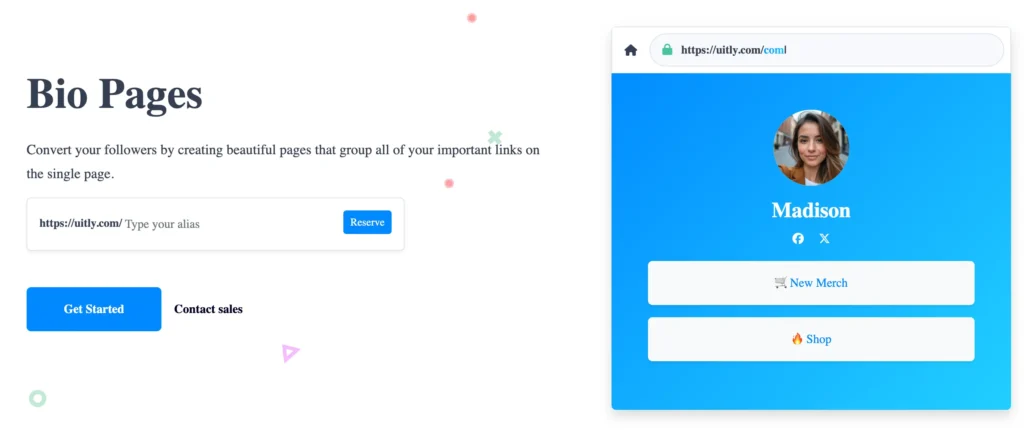
Another feature that separates Uitly from a basic URL shortener is its Bio Page functionality.
A Bio Page allows users to place multiple links on one mobile-friendly page. This can be especially useful for social media profiles where only one primary profile link may be available.
Instead of directing followers to different URLs individually, a creator or business can provide one Bio Page containing multiple destinations.
Possible uses include:
- Website links
- Social media profiles
- Product pages
- Online stores
- Contact pages
- Campaign pages
- Articles
- Promotional offers
Uitly describes its Bio Pages as mobile-optimized landing pages designed to showcase important links in one place.
For influencers and creators, this can simplify profile management. For businesses, it can create a centralized entry point for several marketing destinations.
Link Analytics
Analytics are one of the most important reasons businesses use link-management platforms.
A shortened link can provide more than a cleaner URL when tracking functionality is enabled. It can help marketers understand how people interact with campaigns.
Uitly states that users can track information such as clicks, countries, and referrers.
This information can help answer questions such as:
- How many people clicked a campaign link?
- Which traffic sources generated clicks?
- Which geographic markets responded?
- Which campaign received more engagement?
- Is a social media promotion generating traffic?
- Is an offline QR campaign receiving scans?
Analytics should not be treated as a complete replacement for a full website analytics platform. Instead, link-level analytics can complement tools such as Google Analytics by giving marketers another view of how individual links perform.
Smart Targeting
Uitly also provides targeting options that can make links more flexible.
According to the platform, smart targeting can be used to target users based on countries, languages, and devices.
This can be particularly useful for international campaigns.
For example, a business operating in multiple countries may want users in different markets to reach different landing pages. Similarly, a campaign could require different destinations for mobile and desktop visitors.
Potential targeting applications include:
- Country-specific landing pages
- Language-specific destinations
- Mobile-specific pages
- Desktop-specific pages
- Regional promotions
- International advertising campaigns
Targeting should always be configured carefully because sending users to an incorrect destination can negatively affect the campaign experience.
Smart Deep Linking
Deep linking is another advanced feature offered by Uitly.
Traditional links may simply open a website. Deep links can be configured to help users reach specific content within an application when the appropriate app is installed.
Uitly explains that its smart deep-linking functionality can automatically open mobile apps when installed and direct users toward app installation when the app is not available.
This can be useful for:
- Mobile applications
- App promotion
- E-commerce apps
- Social applications
- Gaming applications
- Mobile marketing campaigns
For businesses with both web and app experiences, deep linking can reduce the number of steps users need to take before reaching the intended destination.
Custom Landing Pages
Uitly also provides custom landing page functionality.
A landing page can be used to focus visitors on a particular campaign, product, service, or offer.
Instead of sending every visitor directly to a general homepage, marketers can create a more focused experience around a particular objective.
A good campaign landing page should generally have:
- A clear headline
- A relevant message
- A strong call to action
- Mobile-friendly design
- Fast loading performance
- Relevant tracking
This type of functionality can be especially useful for paid advertising and promotional campaigns.
CTA Overlays
CTA overlays provide another way of adding marketing elements to destination pages.
According to Uitly, its overlay tool can be used for notifications, polls, or contact elements on target websites.
Potential applications include:
- Promotional notifications
- Contact prompts
- Campaign messages
- User surveys
- Lead-generation elements
As with any overlay, moderation is important. Excessive pop-ups or intrusive elements can negatively affect user experience.
Event Tracking and Tracking Pixels
Marketing campaigns often need more information than simple click counts.
Uitly supports custom tracking pixels and integrations with tracking providers such as Facebook and Google Tag Manager, according to its official website and help resources.
This can allow marketers to connect link activity with broader campaign tracking.
For example, a marketer may want to understand not only whether users clicked a link but also what happened afterward.
Event tracking can help businesses measure actions such as:
- Campaign interactions
- Conversions
- Engagement
- Lead activity
- Marketing events
Tracking should always be implemented according to applicable privacy requirements and the policies of the advertising or analytics platforms being used.
Campaigns and Channels
Managing many individual links can become difficult as marketing activity grows.
Uitly provides campaigns and channels to help users organize their links, Bio Pages, and QR codes.
The official platform explains that campaigns can group these assets and provide aggregated statistics.
This can be useful for agencies and businesses managing multiple campaigns simultaneously.
For example, a company could organize campaigns based on:
- Product launches
- Seasonal promotions
- Social media campaigns
- Regional marketing
- Events
- Paid advertising
- Influencer partnerships
Channels can also help separate different traffic or marketing sources.
Team Management
Businesses rarely manage marketing links through a single person.
Uitly includes team management features that allow users to invite team members and assign privileges.
This can help organizations divide responsibilities between:
- Marketing managers
- Content teams
- Social media teams
- Designers
- Analysts
- Developers
The official site states that team members can be assigned specific privileges and can work across different workspaces.
Permission management is particularly useful when multiple people need access to campaign assets without everyone requiring identical levels of control.
Developer API
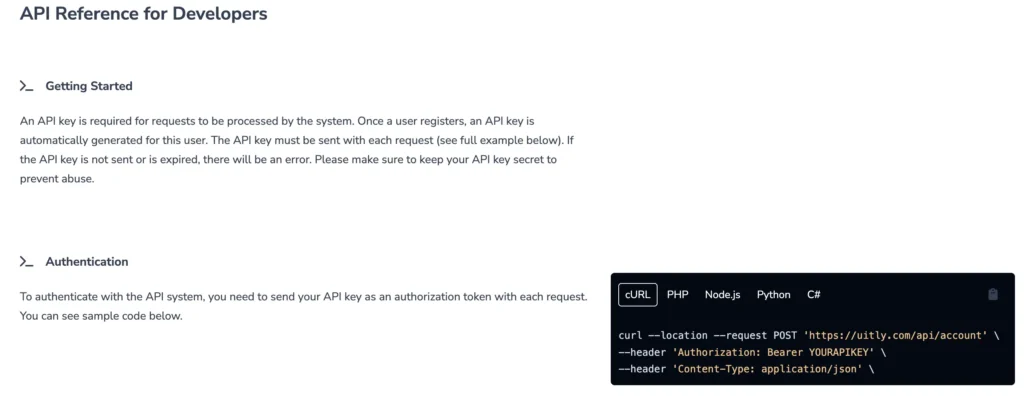
For technical teams, Uitly provides an API.
The API can be useful when a company wants to integrate link creation and management into its own systems rather than manually creating every link through a dashboard.
The official documentation provides API endpoints for functions including account information, branded domains, links, campaigns, channels, pixels, and other resources.
The API uses an API key for authentication, and Uitly documents a rate limit that can vary depending on the subscribed plan.
Potential API use cases include:
- Automated link creation
- Campaign management
- Internal marketing systems
- CRM integrations
- Custom dashboards
- Automated reporting
- Link management workflows
Developers should keep API credentials secure and follow the platform’s current API documentation when building integrations.
Is Uitly Free?
Uitly offers a free package, according to its official help center. Users can start with the free package and upgrade when they need premium functionality.
This makes it possible for users to test the platform before committing to a paid plan.
However, users should distinguish between the availability of a free package and the availability of every advanced feature on that package.
Features such as advanced analytics, targeting, team functionality, higher limits, branded domains, integrations, or other premium capabilities may depend on the account plan.
Because subscription features and pricing can change, users should check the current official subscription information before making a purchasing decision.
Uitly Pricing and Value for Money
Pricing is an important part of any software review, but it should be evaluated alongside the actual requirements of the user.
Someone who only needs a simple short URL may not need an advanced link-management platform.
On the other hand, a marketing agency managing hundreds of campaign links may benefit from features such as:
- Branded domains
- Analytics
- Campaign organization
- Team permissions
- Tracking pixels
- Targeting
- API access
- QR codes
The value therefore depends on how many of these features are actually needed.
For occasional personal use, the free package may be enough to explore the platform. Businesses with larger marketing operations should compare the available plans, limits, integrations, and team features before upgrading.
Is Uitly Easy to Use?
The core concept of Uitly is relatively straightforward.
Users who understand URL shorteners should be able to understand the basic workflow quickly: create a link, customize it if required, share it, and monitor results.
The more advanced features naturally require additional setup.
For example, configuring:
- Branded domains
- Tracking pixels
- Deep links
- Geo targeting
- Device targeting
- API integrations
requires more technical knowledge than simply creating a short URL.
This means the platform can accommodate both relatively simple link-management needs and more advanced marketing workflows.
Uitly for Digital Marketers
Digital marketers can use link-management tools to improve campaign organization and measurement.
A marketer may create separate links for:
- YouTube
- Email campaigns
- Paid advertisements
- QR codes
- Influencer campaigns
- Affiliate promotions
Tracking these links individually can make campaign comparison easier.
For example, if two promotional channels generate different levels of engagement, the marketer can use available analytics to investigate where the traffic originated and how the campaigns performed.
Uitly for Social Media Creators
Social media creators often have multiple destinations they want their followers to visit.
A Bio Page can simplify this process.
Instead of changing the profile link every time a new promotion is launched, a creator can use one central page containing multiple destinations.
This can include:
- Latest video
- Website
- Store
- Newsletter
- Social profiles
- Sponsorship page
- Affiliate links
The mobile-optimized nature of Bio Pages makes this use case particularly relevant for audiences primarily accessing content through smartphones.
Uitly for Businesses
Businesses can use Uitly for both online and offline marketing.
For example, a retail company could place a QR code on packaging that directs customers to a product page.
A restaurant could use a QR code for a digital menu.
A software company could use deep links to direct mobile users toward its application.
A marketing agency could manage separate branded links for multiple clients.
The ability to combine short links, QR codes, analytics, campaigns, and targeting can make a single platform useful across different campaign types.
Uitly for Agencies
Agencies often manage multiple brands and campaigns at the same time.
Team management, workspaces, campaign organization, analytics, and branded domains can therefore be particularly useful.
An agency could structure its workflow by client and campaign instead of keeping all links in one unorganized list.
The API can also become useful for agencies with internal automation systems.
Advantages of Uitly
1. Multiple Marketing Tools in One Platform
Uitly combines URL shortening, QR codes, Bio Pages, analytics, targeting, and other tools.
This can reduce the need to use several separate services.
2. Branded Link Support
Branded domains can provide more control over how links appear to users.
3. Detailed Link Tracking
Click, country, and referrer information can help marketers understand campaign performance.
4. Dynamic QR Codes
Dynamic QR functionality makes QR-based campaigns easier to manage and track.
5. Advanced Targeting
Country, language, and device targeting can make links more adaptable to different audiences.
6. Team Collaboration
Teams can collaborate on links, Bio Pages, and QR codes using assigned privileges.
7. Developer API
The API provides opportunities for automation and integration with external systems.
Potential Limitations of Uitly
No platform is suitable for every user.
Advanced Features May Require More Setup
Users who only want simple URL shortening may find the advanced features unnecessary.
Pricing Should Be Checked Before Purchase
The platform offers a free package, but users should verify the current limits and premium features before choosing a subscription.
Advanced Marketing Features Require Knowledge
Targeting, tracking pixels, deep links, and API integrations may require technical or marketing knowledge.
Link Management Requires Ongoing Organization
Having many links without a clear campaign structure can still become difficult to manage. Users should establish naming conventions and organize campaigns properly.
Is Uitly Safe and Legit?
When evaluating any URL-shortening service, users should consider both platform security and the destinations behind individual links.
Uitly provides link-management functionality and a system for reporting potentially dangerous or unwanted short links. However, users should still avoid clicking unfamiliar shortened URLs from unknown sources.
For businesses, good practices include:
- Using branded domains where appropriate
- Keeping account credentials secure
- Protecting API keys
- Reviewing destination URLs
- Monitoring campaign links
- Removing outdated links
- Using appropriate tracking and privacy settings
A shortened URL does not automatically make the destination trustworthy. Users should evaluate the source and destination of a link before interacting with it.
Uitly vs Traditional URL Shorteners
A traditional URL shortener primarily focuses on turning long URLs into shorter addresses.
Uitly takes a broader approach.
It combines link shortening with:
- QR codes
- Bio Pages
- Analytics
- Branded domains
- Smart targeting
- Deep linking
- Campaign organization
- Team management
- Tracking pixels
- API functionality
This makes the platform more suitable for users who need marketing functionality rather than simply a shorter URL.
Uitly vs Bitly
Bitly is one of the most recognized names in the link-management industry, while Uitly offers a broader collection of features around links, QR codes, Bio Pages, targeting, and campaign management.
The right choice depends on individual requirements.
Users should compare:
- Pricing
- Link limits
- Analytics
- Custom domains
- QR functionality
- Team features
- API access
- Integrations
- Targeting options
Rather than selecting a platform based only on brand recognition, businesses should identify which features they actually need.
How to Create a Short Link With Uitly
The general process is simple.
Step 1: Create an Account
Register for an Uitly account and access the dashboard.
Step 2: Add Your Destination URL
Enter the long URL that you want to shorten.
Step 3: Customize the Link
If available for your account, choose a custom alias or branded domain.
Step 4: Configure Options
Depending on your campaign, you may configure targeting, expiration, password protection, tracking, or other settings.
Step 5: Publish the Link
Generate the short link and test it before distributing it.
Step 6: Monitor Performance
Review the available analytics to understand clicks, traffic sources, geographic activity, and other performance information.
How to Use Uitly for a Marketing Campaign
A strong campaign should begin with a clear objective.
For example, the objective might be to:
- Generate product sales
- Increase app downloads
- Drive website traffic
- Collect leads
- Promote an event
- Increase social engagement
Once the goal is clear, create dedicated links for each important traffic source.
For example:
Campaign: Summer Product Promotion
Links:
- Social media
- QR code
- Paid advertising
- Influencer campaign
Keeping each link separate makes it easier to understand which channel is contributing to campaign performance.
Best Practices When Using Uitly
Use Descriptive Names
Create a consistent naming system for links and campaigns.
Test Every Link
Always test a link before publishing it.
Use Branded Domains for Business Campaigns
A branded domain can make campaign links more recognizable.
Avoid Unnecessary Targeting
Only use targeting rules when they have a clear marketing purpose.
Monitor Campaign Performance
Review analytics regularly rather than creating links and forgetting about them.
Keep Campaigns Organized
Use campaigns and channels to separate different projects.
Protect API Credentials
Never expose API keys publicly or place them directly into client-side code.
Frequently Asked Questions
What is Uitly used for?
Uitly is used for shortening and managing URLs, creating dynamic QR codes and Bio Pages, tracking link performance, organizing campaigns, and applying advanced targeting and marketing functionality.
Is Uitly free?
Yes. Uitly offers a free package, and users can upgrade when they need premium features. Current plan limits and features should be checked before subscribing.
Can Uitly create QR codes?
Yes. Uitly supports dynamic QR codes that can be customized and tracked.
Does Uitly provide analytics?
Yes. Uitly provides analytics for link activity, including information such as clicks, countries, and referrers.
Can I use a custom domain with Uitly?
Yes. Branded domains are one of the platform’s supported features, subject to the applicable account configuration and plan.
Does Uitly have Bio Pages?
Yes. Uitly provides mobile-optimized Bio Pages where users can organize multiple important links on a single page.
Does Uitly support deep links?
Yes. Uitly provides smart deep-linking functionality designed to help direct mobile users toward applications when appropriate.
Can teams use Uitly?
Yes. Team members can be invited and assigned privileges for managing links, Bio Pages, and QR codes.
Does Uitly have an API?
Yes. Uitly provides an API for developers. The official documentation includes endpoints for links, domains, campaigns, channels, pixels, and other account resources.
Is Uitly a URL shortener only?
No. URL shortening is one of its main functions, but the platform also provides QR codes, Bio Pages, analytics, targeting, deep links, campaign management, team collaboration, tracking integrations, and API functionality.
Who should use Uitly?
Uitly can be useful for marketers, businesses, agencies, social media creators, app developers, and teams that need more than basic URL shortening.
Final Verdict: Is Uitly Worth Using?
Uitly is more than a basic URL shortener. Its combination of short links, branded domains, dynamic QR codes, Bio Pages, analytics, smart targeting, deep linking, campaign management, team collaboration, and API functionality makes it a potentially useful platform for users who manage digital marketing campaigns.
The biggest advantage is the ability to bring several link-related activities into one system. Instead of using one service for shortened links, another for QR codes, another for Bio Pages, and separate tools for certain tracking requirements, businesses can potentially manage many of these activities through a single platform.
For casual users who only need an occasional shortened URL, the additional features may be more than necessary. For marketers, agencies, creators, and businesses running multiple campaigns, however, the wider feature set can be considerably more useful.
The availability of a free package also gives users an opportunity to explore the service before deciding whether they need a premium subscription.
Overall, Uitly is worth considering when the goal is not simply to shorten a URL, but to create, organize, track, target, and optimize links as part of a broader digital marketing strategy.
Before choosing a paid plan, users should review the current subscription options, feature limits, integrations, and API availability to ensure that the selected plan matches their specific requirements.